Hello friends, in today’s article we are going to share everything about Motu Patlu Village & City Vlog AI Prompt, absolutely free. Using these AI prompts, you can create amazing village and city vlog-style AI videos with Motu Patlu characters in just one click. These AI-generated videos are currently trending on Instagram Reels, Facebook, YouTube Shorts, and TikTok because they look fun, cinematic, and highly realistic.
In this article, we will explain what Motu Patlu Village & City Vlog AI Prompt is, why it is going viral, how you can create it using AI tools like Google Gemini and other AI video generators, and we will also provide ready-to-use AI prompts that you can simply copy and paste. Make sure you read this article till the end without skipping.
Motu Patlu Village & City Vlog AI Prompt
Motu Patlu Village & City Vlog AI Prompt is a trending AI video editing style where Motu and Patlu are shown exploring beautiful villages, busy cities, markets, streets, farms, parks, and famous locations while recording cinematic vlog videos. The AI generates smooth camera movements, realistic environments, and professional-quality visuals that look like an animated travel vlog.
With AI tools, you don’t need advanced video editing skills or expensive software. Simply upload your reference image (if required), paste the AI prompt, and let the AI generate a stunning vlog video automatically.
Why Is Motu Patlu Village & City Vlog AI Prompt Going Viral on Social Media?
There are several reasons why Motu Patlu Village & City Vlog AI Prompt is becoming viral on social media:
•Cute cartoon characters attract viewers instantly.
•Village and city vlog concepts are entertaining and unique.
•AI creates realistic cinematic animations within seconds.
•No animation or editing experience is required.
•Perfect for Instagram Reels, Facebook videos, YouTube Shorts, and TikTok.
When creators upload these AI-generated vlog videos, many users ask for the prompt in the comments, which increases engagement and helps the trend grow even faster.
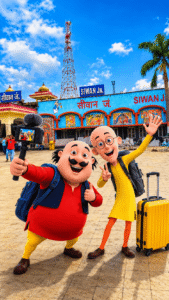
IMAGE PROMPT- Es photo par motu patlu ka photo add kar do vlogging karte huye
VIDEO PROMPT- Characters: [Motu], [Patlu],
Use the uploaded image as the exact character reference. Keep the same character(s), appearance, and original art style. Animate only the character(s) with realistic lip sync, natural facial expressions, eye blinking, head movement, and hand gestures while speaking.
Dialogue: [Motu]: “[हेलो दोस्तों सुजीत भाई ने कमेंट किए थे सिवान आने के लिए]” [Patlu]: “[तो लो दोस्तों हम सिवान आ चुके हैं अगर आप भी अपने गांव में या अपने शहर में हम दोनों भाइयों को बुलाना चाहते हैं तो अपने शहर या गांव का फोटो कमेंट बॉक्स में भेज दीजिए]”
How to Create Motu Patlu Village & City Vlog AI Video
You can easily create Motu Patlu Village & City Vlog AI Video by following these simple steps:
- Open Google Gemini or any AI video generation tool.
- Sign in using your account.
- Upload your reference image if needed.
- Copy any Motu Patlu Village & City Vlog AI Prompt.
- Paste the prompt into the AI tool.
- Click Generate and wait for the AI to process your video.
- Download and save your AI-generated vlog video.
That’s it. Your viral Motu Patlu Village & City Vlog AI Video is ready.
Tips for More Realistic AI Videos
To get the best results, keep these tips in mind:
•Use detailed and specific prompts.
•Include words like cinematic, realistic, 4K, ultra-detailed, and smooth camera movement.
•Describe the location clearly, such as village roads, farms, markets, or modern city streets.
•Add natural lighting and realistic background details.
•Experiment with different camera angles for better results.
These simple tips can make your AI-generated vlog videos look much more professional.
Conclusion
We hope this article helped you understand Motu Patlu Village & City Vlog AI Prompt easily. These AI vlog videos are becoming increasingly popular across social media platforms and are a great way to create engaging content. By using the prompts and steps shared above, you can generate high-quality AI videos in just one click without any editing skills.
If you face any issues or want more AI video editing prompts, you can comment below. We will try our best to help you. You can also check out tutorial videos on our YouTube channel Technical Sujit for step-by-step guidance.


Use the uploaded image as the exact character reference. Keep the same character, face, clothes, and original art style.
Create a modern highway scene where the character stands smiling below a large green Indian highway welcome billboard. The billboard reads:
WELCOME
[CITY/STATE NAME]
Use realistic Indian expressway details, vehicles, trees, blue sky, cinematic lighting, vibrant colors, centered composition, ultra-detailed, 8K, vertical 9:16.
Motu patlu vilage