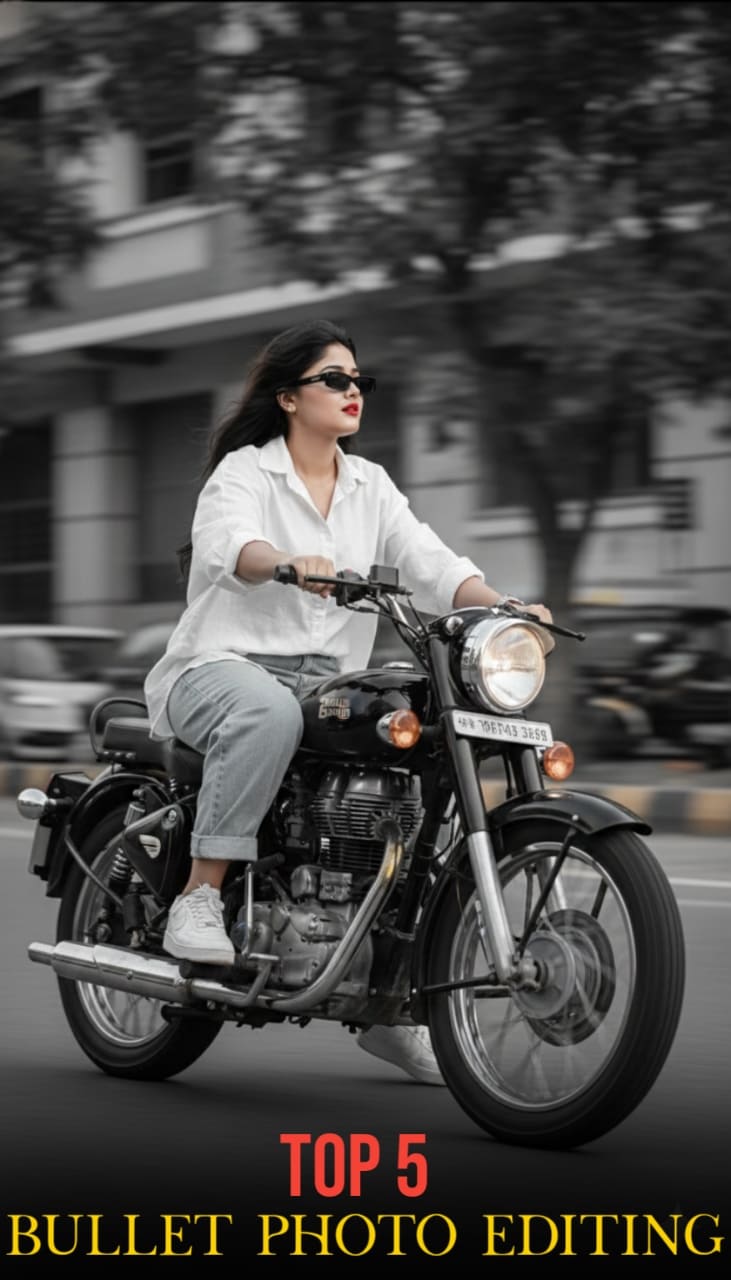
Hello friends, in today’s article we are going to share everything about Bullet Photo Editing AI Prompts, absolutely free. Using these AI prompts, you can create stunning bullet-style cinematic photos with your own picture in just one click. These edits are currently trending on Instagram, Facebook, and YouTube Shorts because they look powerful, dramatic, and highly realistic.
In this article, we will explain what Bullet Photo Editing is, why it is going viral, how you can create it using AI tools like Google Gemini, and we will also provide ready-to-use AI prompts that you can simply copy and paste. Make sure you read this article till the end without skipping.
Why Bullet Photo Editing Is Going Viral
There are several reasons why Bullet Photo Editing AI photos are becoming viral on social media:
• Action and cinematic looks always attract attention
• Bullet effects create a powerful and dramatic vibe
• No real photoshoot or props are needed
• AI generates results in seconds
• Perfect for reels, shorts, and profile pictures
When people upload these photos, many users comment asking for the prompt, which increases engagement and helps the trend grow even more.
What is Google Gemini AI?
Gemini AI introduces a new “Nano Banana” image generation feature that makes photo editing and AI creativity more natural and believable One of its best upgrades is character consistency If you upload a photo and ask for a new pose, outfit, or background, the face and key details remain the same without distortion Another great feature is multi-image blending that lets you combine two or more photos into a seamless and realistic scene—for example, combining your pet with a new location You can also make quick changes with simple commands like “Change background” or “Change pose,” and Gemini AI will edit your photo accordingly To ensure authenticity, each AI-generated image comes with a visible watermark and invisible SynthID digital tagging, so viewers know the content is created by AI
Bullet Photo Editing Ai Prompts
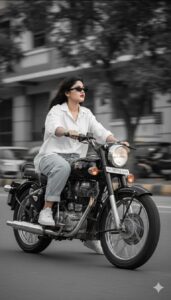
PROMPT- A confident young woman riding a black Royal Enfield Bullet 350, leaning naturally with both hands on the handlebars and glancing to the side. Her face is fully visible with an original, realistic female look. She wears an oversized white linen shirt, light blue baggy jeans, white Nike Air Force 1 sneakers, a silver wristwatch, and narrow rectangular sunglasses. Cinematic black-and-white Leica M11 Monochrome style with vintage film grain, strong motion blur in the background, sharp focus on the rider, urban street vibe, dynamic and stylish.
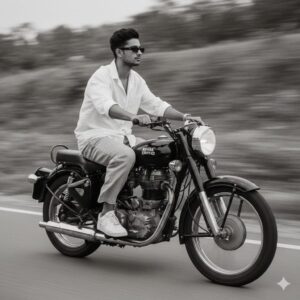
PROMPT- A slim-fit 5’7 young man riding his black Royal Enfield Bullet 350, glancing confidently to the side, hands on the handlebars, leaning naturally into the ride. He’s wearing an oversized white linen shirt with the top buttons open, light blue baggy jeans, and clean white Nike Air Force 1 sneakers. A silver wristwatch shines subtly on his wrist, and narrow-frame rectangular classy sunglasses complete his preserve 100% face. look. His face is fully visible
The photo features a vintage cinematic grain aesthetic with Leica M11 Monochrome black-and-white tones, enhanced with a motion blur effect to convey speed and dynamic movement.
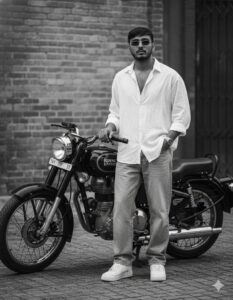
PROMPT- A slim-fit 5’7 young man posing confidently beside a black Royal Enfield Bullet 350. He’s wearing an oversized white linen shirt with the top buttons casually open, light blue baggy jeans, and clean white Nike Air Force 1 sneakers. A silver wristwatch and narrow-frame rectangular classy sunglasses complete his effortlessly stylish look. He stands with one hand resting on the Bullet’s handle and the other in his pocket, giving a calm, composed expression. The scene has a vintage cinematic grain and Leica M11 Monochrome black-and-white aesthetic, creating a timeless, nostalgic mood with soft highlights and film-like depth. Prepare 100% Face.
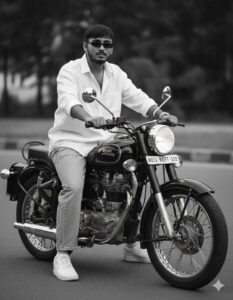
PROMPT- A slim-fit 5’7 young man riding his black Royal Enfield Bullet 350, hands firmly on the handlebars, leaning slightly forward in a natural riding posture.
He’s wearing an oversized white linen shirt with the top buttons open, light blue baggy jeans, and clean white Nike Air Force 1 sneakers. A silver wristwatch glints subtly on his wrist, and narrow-frame rectangular classy sunglasses complete his look. His expression is confident and natural preserve 100% face. The photo carries a vintage cinematic grain aesthetic with Leica M11 Monochrome black-and-white tones, evoking a timeless, nostalgic film vibe.

PROMPT- A slim-fit 5’7 young man sitting casually on a black Royal Enfield Bullet 350, both feet firmly on the ground. He’s wearing an oversized white linen shirt with the top buttons open, light blue baggy jeans, and clean white Nike Air Force 1 sneakers. A silver wristwatch and narrow-frame rectangular sunglasses add subtle sophistication. His posture is relaxed as he looks toward the camera with a confident expression preserve 100% face.
Captured in vintage cinematic grain with a Leica M11 Monochrome black-and-white tone, giving a timeless film aesthetic. Monochrome Photo.
How to Create Bullet Photo Editing Using AI
You can easily create Bullet Photo Editing AI photos by following these steps:
- Open Google Gemini or any AI image editing tool
- Sign in using your Google account
- Upload your clear photo
- Copy one Bullet Photo Editing AI prompt from above
- Paste the prompt with your photo
- Click generate and wait 10 to 20 seconds
- Download and save your edited image
- That’s it. Your viral bullet photo is ready.
Tips for More Realistic Bullet AI Photos
To get the best results from Bullet Photo Editing AI, keep these tips in mind:
• Use a clear, high-quality photo
• Avoid long prompts, keep them specific
• Add words like cinematic, realistic, ultra-detailed
• Try dark or moody backgrounds for better effect
• Slightly adjust brightness and contrast after generating
These small tweaks can make your photo look much more professional.
Conclusion
We hope this article helped you understand how to create Bullet Photo Editing AI Prompts easily. Bullet-style AI photos are trending fast and are perfect for social media content. By using the prompts and steps shared above, you can create eye-catching images in just one click without any editing skills.
If you face any issues or want more AI photo editing prompts, you can comment below. We will try our best to help you. You can also check out tutorial videos on our YouTube channel Technical Sujit for step-by-step guidance.

1 thought on “Bullet Photo Editing Ai Prompts”