Hello friends, in today’s article we are going to share everything about the 3D Action Figure Video Generator trend, absolutely free. Using AI tools, you can create stunning 3D action figure videos featuring yourself in just one click. These videos are currently trending on Instagram, Facebook, YouTube Shorts, and TikTok because they look highly realistic, creative, and professional.
In this article, we will explain what the 3D Action Figure Video Generator is, why it is going viral, how you can create it using AI tools like Google Gemini, and we will also provide ready-to-use AI prompts that you can simply copy and paste. Make sure you read this article till the end without skipping.
What is 3D Action Figure Video Generator?
3D Action Figure Video Generator is a viral AI trend where your photo is transformed into a realistic action figure or collectible toy character. The AI creates a cinematic video showing your action figure inside a premium toy box, standing in dynamic poses, or performing stylish animations.
The final result looks like a professional commercial advertisement for a premium action figure, making it perfect for social media content.
With modern AI tools, you do not need any video editing skills, animation software, or expensive equipment. You simply upload your photo, enter a prompt, and the AI generates the entire video automatically.
Why Is 3D Action Figure Video Generator Going Viral?
There are several reasons why this trend is becoming extremely popular on social media:
• Creates a unique and eye-catching toy version of yourself
• Looks highly realistic and professional
• No editing experience is required
• AI generates videos within seconds
• Perfect for Instagram Reels, YouTube Shorts, and TikTok
• Makes personal content more engaging and shareable
When creators upload these videos, viewers often ask how they were made, which increases engagement and helps the trend spread even faster.
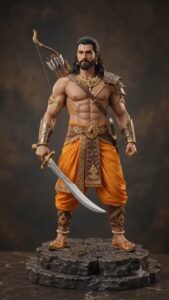
IMAGE PROMPT- Create a 5×2 storyboard grid. Maintain absolute consistency with the uploaded person as the character design, the uploaded outfit as the costume, and the uploaded accessories as props. Preserve facial features, hairstyle, proportions, colors, textures, and materials throughout all frames. Use photorealistic premium collectible quality with cinematic three-point studio lighting and shallow depth of field. Frame 1: Black collector box labeled “King” being opened. Frame 2: Top-down view revealing foam insert with disassembled character parts, outfit pieces, and accessories. Frame 3: Rocky base pieces interlocking. Frame 4: Lower body wearing the uploaded outfit attached to the base. Frame 5: Upper body assembly preserving exact appearance of the uploaded person. Frame 6: Head attachment with detailed facial features and hairstyle matching the uploaded person. Frame 7: Uploaded accessories and props attached to the figure. Frame 8: Completed hero pose of the action figure. Frame 9: Smooth 360-degree showcase revealing all details. Frame 10: Extreme close-up portrait emphasizing face, outfit textures, and accessories. Photorealistic, physically accurate, premium toy commercial, cinematic macro lens, professional studio lighting, epic and majestic mood. Make the aspect ratio 9:16
VIDEO PROMPT- Use the uploaded storyboard images as the visual reference and maintain complete continuity between all scenes. The uploaded person remains the main character design throughout the video. Preserve the uploaded outfit exactly, including colors, textures, embroidery, and fabric details. Preserve the uploaded accessories and props exactly as shown in the storyboard images. Create a photorealistic premium collectible commercial with cinematic studio lighting, shallow depth of field, and physically accurate materials. Begin with a box opening to reveal organized figure components inside custom foam packaging. Show a satisfying step-by-step assembly process where the base is connected, followed by the lower body, upper body, head, and accessories. Hands interact naturally while assembling the figure. Maintain exact facial features, hairstyle, outfit, body proportions, and costume consistency from the uploaded storyboard images. No morphing, distortion, redesign, or surreal transformations. Use macro and portrait lenses with smooth cinematic movements, subtle push-ins, focus pulls, and elegant product-commercial framing. During the final reveal, the completed figure performs a smooth 360-degree rotation while the camera slowly orbits around the subject at eye level. Add a gentle push-in toward the face for the climax, emphasizing intricate craftsmanship, realistic textures, and premium collectible quality. Mood is epic, majestic, devotional, and awe-inspiring. Professional three-point lighting, realistic shadows, cinematic depth, premium product commercial quality, ultra-detailed, photorealistic, physically accurate.
How to Create a 3D Action Figure Video
You can easily create a 3D Action Figure Video by following these simple steps:
- Open Google Gemini or any AI video generation tool
- Sign in using your Google account
- Upload your clear portrait photo
- Copy the AI prompt provided below
- Paste the prompt along with your image
- Click Generate and wait for the AI to process
- Download the generated video
- Save and share it on your social media accounts
That’s it. Your viral 3D Action Figure Video is ready.
Tips for Better Results
To get the best quality output, keep these tips in mind:
• Use a clear and high-resolution photo
• Make sure your face is visible
• Use detailed AI prompts
• Choose cinematic lighting effects
• Avoid blurry or low-quality images
• Experiment with different action figure styles
These small improvements can make your final video look much more realistic and professional.
Conclusion
We hope this article helped you understand the 3D Action Figure Video Generator trend easily. This AI video style is currently one of the fastest-growing trends on social media and is perfect for creating unique content with your own photos.
By using the prompt and steps shared above, you can generate amazing action figure videos in just a few clicks without any editing skills. If you face any issues or want more AI photo and video editing prompts, you can comment below. We will try our best to help you. You can also visit our YouTube channel Technical Sujit for detailed tutorials and step-by-step guidance.
