Are you looking for a Trending Car Driving AI Video Prompt to create realistic and cinematic car driving videos using AI? In this article, you will find trending AI car driving prompts that you can use with ChatGPT and other AI video-generation tools to create amazing car videos.
With the help of AI, you can transform your photo into a realistic car driving video. You can create cinematic driving scenes, luxury car videos, highway driving clips, and trending Instagram Reels without professional video editing skills.
Trending Car Driving AI Video Prompt
AI car driving videos are becoming popular on Instagram, YouTube Shorts, and other social media platforms. If you also want to create a realistic car driving video using your own photo, you can use the prompts given below.
These prompts are designed to help you generate cinematic car driving scenes with realistic lighting, smooth camera movements, and detailed environments.
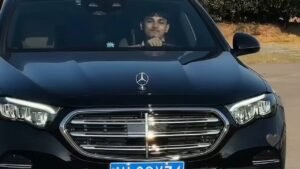
Create a highly realistic 10-second cinematic video using the reference image/person as the exact identity reference. IMPORTANT: Preserve the person's exact face, facial structure, skin tone, hairstyle, body proportions, outfit, and overall appearance throughout the entire video. Do not change identity. Use realistic human body-motion tracking and natural facial movement. Maintain temporal consistency from frame to frame. CAMERA / SCENE: A young man is sitting naturally in the driver's seat of a black luxury Mercedes sedan at night. Camera is positioned outside/front of the car and gradually feels closer to the person through the windshield. Interior is dimly lit with soft cool nighttime lighting. The steering wheel remains visible in the foreground. Realistic windshield reflections, subtle dashboard lighting, natural shadows and cinematic DSLR look. No camera shake or unnatural warping. BODY MOTION TRACKING — FOLLOW THIS EXACT SEQUENCE: 0.0–1.2 seconds: The person is seated naturally behind the steering wheel. Upper body relaxed and centered. Both shoulders remain anatomically stable. He looks toward the camera with a calm expression. Very subtle breathing movement in chest and shoulders. Natural blinking. Hands remain in a believable driving position. 1.2–2.5 seconds: He begins moving his upper body slightly toward the camera. His head moves naturally with the torso. He starts smiling. One hand gradually lifts away from the steering wheel. Track the hand from shoulder → elbow → wrist → fingers with correct human joint movement. No floating or disconnected fingers. 2.5–3.8 seconds: He raises one hand beside his face and makes a casual two/three-finger gesture. Elbow bends naturally. Wrist rotates slightly. Fingers move independently and realistically. At the same time, he tilts his head slightly to one side. His eyes remain directed toward the camera. Expression becomes playful and confident. 3.8–5.2 seconds: He lowers the raised hand slightly. His smile becomes wider. Natural cheek movement and subtle eye squint. Head returns partially toward center. Shoulders and neck follow the head movement naturally. Keep the steering wheel and car interior fixed in perspective. 5.2–6.8 seconds: He turns his face slightly toward one side while maintaining a relaxed smile. His raised arm moves backward and upward naturally, with the hand approaching the side/back of his head. Track shoulder, elbow, wrist and fingers continuously. The movement must look like a real person casually resting his hand near his head. 6.8–8.5 seconds: He leans his head gently toward the same side. Hand stays naturally near/behind the head. Maintain realistic neck compression and shoulder movement. He smiles directly toward the camera. Small natural facial movements: blinking, eyebrow movement, cheek movement and subtle lip motion. 8.5–10.0 seconds: He slowly brings his head back toward a relaxed position while keeping a warm smile. His body settles naturally into the driver's seat. Hand remains relaxed. Finish with a natural confident expression looking toward the camera. End smoothly without sudden movement. BODY-MOTION REQUIREMENTS: – Full skeletal consistency throughout the shot. – Track head, neck, shoulders, upper arms, elbows, wrists, hands and fingers. – Preserve correct joint anatomy. – Natural weight distribution and body inertia. – No rubber-like limbs. – No extra fingers. – No finger merging. – No duplicated hands. – No disappearing limbs. – No unnatural shoulder deformation. – No sudden pose changes. – Maintain exact body proportions from the reference. – Facial identity must remain unchanged. FACIAL MOTION: Natural blinking. Natural eye movement toward the camera. Subtle eyebrow movement. Realistic smile progression. Natural cheek and jaw movement. No exaggerated facial deformation. No face morphing. CAMERA: Stable front-facing cinematic camera. Very subtle natural push-in toward the subject. Keep the person's face as the primary focus. Maintain realistic perspective and depth. No sudden zoom. No camera rotation. LIGHTING: Nighttime environment. Cool blue/white light from the car interior and surroundings. Soft highlights on the face. Realistic shadows around the neck and shoulders. Natural windshield reflections. Physically accurate lighting and reflections. STYLE: Ultra-photorealistic. High-end DSLR/cinematic footage. Natural skin texture. Realistic hair strands. Realistic fabric movement. Realistic Mercedes interior materials. Smooth 24/30fps motion. High temporal consistency. No AI-looking artifacts. NEGATIVE PROMPT: face distortion, identity change, face morphing, different person, body deformation, extra fingers, missing fingers, fused fingers, extra arms, duplicated hands, floating hands, disconnected limbs, broken joints, unnatural elbow movement, rubber limbs, warped steering wheel, warped car interior, flickering face, changing hairstyle, changing clothes, unnatural smile, frozen expression, eye distortion, camera shake, sudden zoom, unnatural motion, low resolution, cartoon, CGI, plastic skin, oversharpening, frame flicker, temporal inconsistency.
How to Create AI Car Driving Videos?
To create an AI car driving video, you need a suitable photo and an AI video-generation tool. You can use your own photo or a car image and apply the prompt to generate a cinematic video.
Follow the steps below to create your trending car driving AI video.
Step 1: Open ChatGPT or your preferred AI video-generation tool.
Step 2: Upload your car photo or the image you want to use.
Step 3: Copy one of the AI car driving prompts given below and paste it into the AI tool.
Step 4: Generate your video and wait for the AI tool to finish processing.
Step 5: Download the generated video and edit it using CapCut or VN Editor before sharing it on Instagram or YouTube.
Tips for Creating Viral AI Car Videos
If you want your AI car driving videos to look more realistic and engaging, keep these tips in mind:
– Use a high-quality car photo.
– Keep the car’s original color and design consistent.
– Add cinematic camera movements and realistic lighting.
– Use smooth motion and detailed backgrounds.
– Edit the final video with music and suitable effects.
Conclusion
Creating a Trending Car Driving AI Video is easy with the right AI tools and prompts. You can use the prompts shared in this article to generate cinematic car driving videos for Instagram Reels, YouTube Shorts, and other social media platforms.
Try different driving scenes, camera angles, and environments to create unique AI car videos. If you found these prompts helpful, share this article with your friends who enjoy AI video editing.
Which car driving AI video prompt will you try first? Let us know in the comments!
