Hello friends, in today’s article we are going to talk about the latest trending concept Airport Celebrity AI Video Editing. This trend is going viral on Instagram Reels, Facebook, and YouTube Shorts because it gives your normal video a full celebrity-style airport entry look.
Using AI tools, you can turn your simple photo or video into a cinematic airport scene where you appear like a VIP celebrity walking with confidence, paparazzi flashes, security, and slow-motion effects. The best part is you don’t need any editing skills.
What is Airport Celebrity AI Video Editing?
Airport Celebrity AI Video Editing is a modern AI-based editing style where your photo or short clip is transformed into a professional-looking airport entry video.
In this style:
•You appear like a famous celebrity arriving at an airport
•Background includes luxury cars, airport gates, or paparazzi
•Slow-motion walking with cinematic lighting
•Flash lights, camera effects, and crowd vibe
The final output looks like a real celebrity moment captured by media cameras.
Why Is Airport Celebrity AI Video Trending?
This trend is getting huge engagement on social media for a few simple reasons:
•Celebrity-style content always grabs attention
•Airport entry scenes look premium and classy
•No real travel or expensive setup required
•AI creates high-quality video in seconds
•Perfect for reels, shorts, and profile content
People love this trend because it gives a “famous personality” feel without any real shoot.
How to Create Airport Celebrity AI Video Editing
You can easily create your own AI airport celebrity video by following these steps:
- Open any AI tool like Google Gemini or similar AI video generator
- Login with your account
- Upload your clear photo or short video
- Copy the prompt given below
- Paste the prompt in the AI tool
- Click on generate
- Wait for 10–30 seconds
- Download your final video
That’s it. Your celebrity-style airport video is ready.
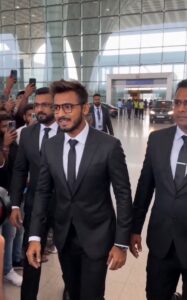
PROMPT- 🎬🔥 Ultra-Realistic Celebrity Entry Prompt
Create an ultra-realistic mass celebrity entry scene captured in a single continuous handheld shot from the crowd’s perspective. The video must feel like raw, documentary-style footage no cuts, no transitions, no stylization. Maintain natural micro-shake, imperfect framing, and real camera behavior throughout.
Use the provided reference image and ensure the main character’s face, hairstyle, beard density, skin tone, outfit, and body proportions remain EXACTLY identical in every frame. No distortion, no enhancement, no stylization. Identity consistency is critical.
🎭 Main Character:
A 25-year-old Indian male celebrity (Sujit Sir) with:
– Sharp, well-defined facial features
– Medium-brown skin tone (exactly matching reference)
– Thick, naturally curly hair with slight volume, subtly falling on forehead
– Well-groomed full beard + trimmed mustache (clean edges, balanced density)
– Rectangular black eyeglasses with subtle reflections
-👔 Outfit (STRICT MATCH – NO CHANGES):
– Tailored black formal suit (slim fit, structured shoulders)
– Crisp white dress shirt (fully buttoned, sharp collar)
– Solid black tie (perfectly aligned)
– Black formal trousers (clean fall, no wrinkles)
– Black leather belt (minimal metallic buckle)
– Polished black formal shoes (slight natural reflection)
Overall Look: Premium, corporate celebrity — clean, elegant, minimal.
🧍 Body Language & Aura:
– Calm, confident, composed
– Subtle natural smile (no overacting)
– Smooth walking posture, relaxed shoulders
– Hands naturally swinging or near pockets
– Controlled, effortless movement
💡 Lighting:
– Natural daylight through large airport glass panels
– Soft highlights on face and suit
– Realistic shadows (under chin, body grounding)
– Slight atmospheric haze for cinematic depth
– Subtle reflections on polished airport floor
-🔊 Audio (STRICTLY NATURAL – NO MUSIC):
– Loud crowd cheering
– People shouting: “Sujit Sir!”
– Overlapping chaotic voices
– Phone recording sounds
– Rapid camera shutter clicks
– Airport announcement echoes
– Footsteps, fabric movement
– Distant vehicle engine idle/rev
—
🎥 SCENE FLOW:
⏱️ 0–3s:
– Handheld camera inside dense crowd behind metal barricades
– Slight jitter, micro-shake, partial occlusion (hands, heads, phones)
– Multiple phone screens visible recording- Crowd chanting: “Sujit! Sujit!”- Camera struggles to find clear view toward arrival gate
-⏱️ 3–6s:
– Camera lifts slightly above shoulder height
– Focus shifts between heads, hands, distant gate
– Natural focus hunting (imperfect autofocus)
– Flash bursts from cameras
– Crowd leaning forward aggressively–
⏱️ 6–10s:
– Security pushes crowd → camera jolts slightly
– Through gaps, celebrity appears (initial soft focus → gradually sharp)
– Walking forward confidently
– Two bodyguards in dark suits on both sides
– Suit fabric moves naturally with motion—
⏱️ 10–13s:
– Natural handheld push-in (NO artificial zoom)
– Face now sharp and consistent
– Eyeglasses reflect light subtly
– Fan from left shouts emotionally:
“Sujit Sir! Please ek photo!!”
– Celebrity reacts:
– Slight head turn
– Brief eye contact
– Subtle genuine smile
– Small wave
– Crowd volume spikes instantly
– Camera struggles as people surge forward—
⏱️ 13–15s:
– Camera tilts/shifts rapidly to follow movement
– Black SUVs ahead (G-Wagon G63 style presence)
– Bodyguard opens rear door
– Celebrity smoothly enters vehicle without breaking composure—
⚠️ Execution Constraints (CRITICAL):
– ❌ No cuts, no transitions — single continuous shot
– ❌ No slow motion
– ❌ No cinematic/artificial lens effects
– ❌ No fake bokeh, overlays, or filters
– ✅ Maintain real camera imperfections (shake, occlusion, focus breathing)
– ✅ Crowd must feel organic (no repeated faces/actions)
– ✅ Maintain perfect identity consistency in ALL frames
– ✅ Natural motion physics only (no exaggerated animation)—
🎯 Output Quality:
Ultra-realistic, documentary-grade footage.
Should feel like a real viral airport celebrity moment captured on phone — raw, chaotic, immersive, and believable.
Tips for Best Results
If you want your video to look more realistic and viral, follow these tips:
•Use a clear, front-facing photo or video
•Choose a confident pose or walking style
•Keep prompt simple but detailed
•Add words like cinematic, ultra realistic, 4K
•Try different lighting styles (night, sunset, flash)
•Adjust brightness and contrast after generation
Small improvements can make a big difference in final output.
Best Use Ideas for This Trend
You can use Airport Celebrity AI Videos for:
•Instagram Reels
•YouTube Shorts
•Facebook videos
•WhatsApp status
•Personal branding content
This type of content gets high engagement because it feels premium and unique.
Conclusion
Airport Celebrity AI Video Editing is one of the fastest-growing AI trends right now. It allows you to create high-quality, cinematic videos without any professional setup or editing skills.
By using the prompt and steps shared in this article, you can easily create your own celebrity-style airport video and stand out on social media.
If you want more AI video editing prompts or trending ideas, you can follow your YouTube channel Technical Sujit for regular updates and tutorials.
