Hello friends, in today’s article we are going to talk about Instagram & Facebook Profile Drawing Photo Editing, which is currently one of the most trending styles on social media. With the help of AI, you can convert your normal photo into a stylish drawing or sketch profile picture in just one click.
These profile drawing edits are going viral on platforms like Instagram and Facebook because they look clean, artistic, and highly attractive. If you also want to upgrade your profile look, this guide will help you step by step.
What is Profile Drawing Photo Editing?
Profile Drawing Photo Editing is a modern AI editing style where your photo is transformed into a digital drawing, sketch, or cartoon-style image. It gives your profile picture a unique and creative look, making it stand out from normal photos.
The best part is that you don’t need any editing skills. AI tools automatically generate the drawing effect using simple prompts.
Why Is Profile Drawing Editing Trending?
There are a few simple reasons why this trend is growing so fast:
• Clean and aesthetic look for profile pictures
• Makes your account look more professional
• No need for expensive photoshoots
• Easy to create within seconds
• Perfect for Instagram DP and Facebook profile
People love unique profile pictures, and drawing-style edits instantly grab attention.
How to Create Profile Drawing Photo Editing
You can easily create your own drawing profile photo by following these steps:
- Open any AI tool like Google Gemini or similar apps
- Sign in with your account
- Upload your clear face photo
- Copy a drawing-style prompt (given below)
- Paste the prompt with your image
- Click on generate and wait for a few seconds
- Download your final image
That’s it. Your stylish profile drawing is ready.
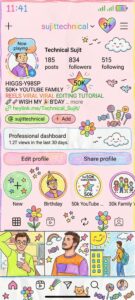
PROMPT- create the entire image in a crayon drawing style. Simplify the details so that it looks like it was drawn by a 10-year-old child. Do not use the original colors from the image. Make the overall look feel like it was drawn on a sheet of white paper, with a very cute and playful vibe. You can add adorable elements such as flowers, candies, stars, clouds, etc., to give it a childlike and innocent feel.
Tips for Better Results
To make your profile drawing look more realistic and attractive:
• Use a clear and high-quality photo
• Keep your face visible (avoid blur or shadows)
• Try different prompts for better styles
• Use simple background photos
• Adjust brightness and contrast after download
These small changes can improve your final result a lot.
Where to Use These Photos?
You can use your drawing-style images in many places:
• Instagram profile picture
• Facebook DP
• WhatsApp profile
• YouTube channel logo
• Personal branding
It gives your online presence a creative and professional touch.
Conclusion
Instagram & Facebook Profile Drawing Photo Editing is one of the easiest and most trending ways to create a unique profile picture. With AI tools and simple prompts, anyone can create stunning drawing-style images in just a few seconds.
If you want more trending AI editing prompts or tutorials, you can follow your YouTube channel Technical Sujit for step-by-step guides.

Suraj rajput up 47