Hello friends, in today’s article we are going to share everything about Collage Photo AI Prompt, absolutely free. Using this AI prompt, you can create amazing collage-style photos with your own pictures in just one click. These edits are currently trending on Instagram, Facebook, and YouTube Shorts because they look creative, stylish, and highly realistic.
In this article, we will explain what Collage Photo AI Prompt is, why it is going viral, how you can create it using AI tools like Google Gemini, and we will also provide ready-to-use AI prompts that you can simply copy and paste. Make sure you read this article till the end without skipping.
Collage Photo AI Prompt
Collage Photo AI Prompt is a trending AI photo editing style where multiple photos are combined into one beautiful collage using artificial intelligence. The AI arranges your images with creative layouts, cinematic lighting, aesthetic backgrounds, and professional effects to create a unique masterpiece.
With AI tools, you don’t need Photoshop or advanced editing skills. Simply upload your photos, paste the prompt, and the AI will generate a stunning collage automatically within seconds.
Why Is Collage Photo AI Prompt Going Viral on Social Media?
There are several reasons why Collage Photo AI Prompt is becoming viral on social media:
•Creative collage layouts look unique and attractive.
•Multiple memories can be displayed in a single image.
•AI generates professional-quality edits instantly.
•No manual editing or graphic design skills are required.
•Perfect for Instagram posts, Facebook covers, YouTube thumbnails, and profile photos.
People love sharing collage images because they stand out in the feed and receive more likes, comments, and shares.
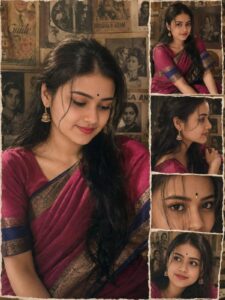
PROMPT- A vintage-style photo collage with torn, deckled paper borders, featuring a beautiful young South Asian woman with long, wavy black hair, wearing a traditional magenta pink saree with a deep blue and gold zari border, and a matching short-sleeve blouse.
The main image on the left is a medium close-up of her smiling softly, looking down, adorned with traditional gold jhumka earrings and a small black bindi with a gold accent on her forehead.
The right side features a vertical stack of smaller, torn-edge candid snapshots: the top showing her sitting gracefully, the second a side profile, the third an extreme close-up of her eyes looking directly into the camera through strands of hair, and the bottom looking up with a gentle smile. The background is a nostalgic, warm-toned wall covered in old black-and-white retro photographs and vintage movie posters. Soft, warm cinematic lighting, analog film grain, cozy sepia undertones, highly detailed, 35mm photography style. Ratio 3:4
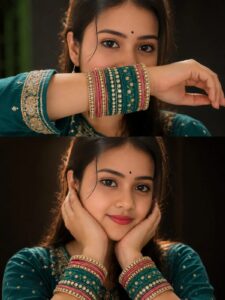
PROMPT- Two-panel vertical collage of a young South Asian woman wearing a traditional teal and gold embroidered outfit. She has long dark hair, brown eyes, soft makeup, and a small black bindi.
Top Panel: Close-up shot where she covers
the lower half of her face with her forearm, prominently showcasing a thick stack of teal, pink, and gold stone-studded bangles.
Bottom Panel: Close-up portrait of her
smiling softly, cradling her face in both hands while wearing identical colorful bangles on both wrists. Dark background, warm dramatic lighting.
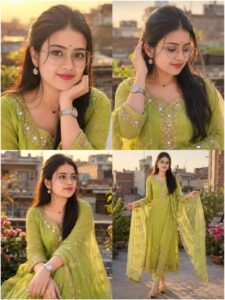
PROMPT- A high-quality, ultra-realistic portrait collage of a beautiful young South Asian woman standing on a rooftop during golden hour. She has a fair glowing complexion, large expressive dark-brown eyes, soft pink lips, and long silky black hair styled in an elegant half-up half-down hairstyle with gentle face-framing strands. She wears round clear-lens prescription glasses with thin silver metal frames, sparkling flower-shaped diamond earrings, a delicate black heart pendant necklace, and a silver luxury wristwatch.
She is dressed in a vibrant lime-green traditional Anarkali suit (salwar kameez) featuring intricate gold zari embroidery, mirror work, and sequin embellishments around the neckline, sleeves, and borders. A matching sheer chiffon dupatta with embroidered floral motifs drapes gracefully around her arms.
The collage contains four different poses: a close-up portrait with her chin resting softly on her hand while smiling at the camera, a candid shot looking downward while touching her hair, a graceful seated pose gazing into the distance, and a full-body pose holding the flowing dupatta. Natural sunlight illuminates her face with warm golden highlights, creating soft shadows and beautiful skin tones.
Background shows a softly blurred urban rooftop environment with brick buildings, greenery, flowers, and creamy bokeh.
Cinematic depth of field, shallow focus, dreamy atmosphere, professional fashion photography, ultra-detailed facial features, realistic skin texture, sharp eyes, natural makeup, warm sunset lighting, soft glow, elegant feminine aesthetic, Instagram-worthy composition, DSLR quality, 85mm portrait lens, f/1.8 aperture, HDR, 8K resolution, photorealistic, highly detailed, premium fashion editorial style. Ratio 3:4
How to Create Collage Photo AI
You can easily create your own Collage Photo AI by following these simple steps:
- Open Google Gemini or any AI image generation tool.
- Sign in using your Google account.
- Upload 2 to 6 clear and high-quality photos.
- Copy the Collage Photo AI Prompt.
- Paste the prompt along with your images.
- Click on Generate and wait for 10 to 20 seconds.
- Download and save your AI collage photo.
That’s it! Your viral Collage AI Photo is ready.
Tips for More Realistic Collage Photos
To get the best results, follow these tips:
•Use high-quality images with good lighting.
•Upload photos with similar backgrounds for better blending.
•Keep the AI prompt clear and specific.
•Add words like cinematic, ultra-realistic, 8K, professional, and high-detail.
•Slightly adjust brightness and contrast after generating the image.
These simple tips will help you create more attractive and professional-looking collage photos.
Conclusion
We hope this article helped you understand Collage Photo AI Prompt easily. Collage AI photo editing is one of the fastest-growing trends on social media and is perfect for creating eye-catching content. By using the prompts and simple steps shared above, you can generate stunning collage images in just one click without any editing experience.
If you face any issues or want more AI photo editing prompts, you can comment below. We will try our best to help you. You can also check out tutorial videos on our YouTube channel Technical Sujit for complete step-by-step guidance.

Photo maga