Hello friends, in today’s article we are going to share everything about Blue Portrait Photo AI Prompt, absolutely free. Using this AI prompt, you can create stunning blue-themed cinematic portrait photos with your own picture in just one click. These edits are currently trending on Instagram, Facebook, and YouTube Shorts because they look stylish, premium, and highly realistic.
In this article, we will explain what Blue Portrait Photo AI Prompt is, why it is going viral, how you can create it using AI tools like Google Gemini, and we will also provide ready-to-use AI prompts that you can simply copy and paste. Make sure you read this article till the end without skipping.
Blue Portrait Photo AI Prompt
Blue Portrait Photo AI Prompt is a trending AI photo editing style where your normal photo is transformed into a cinematic blue portrait with dramatic lighting, soft shadows, glowing effects, and a professional DSLR-style look using artificial intelligence. The final image looks artistic, modern, and premium, making it perfect for social media profiles and viral posts.
With AI tools, you don’t need Photoshop skills or complicated editing apps. Simply upload your photo, paste a prompt, and let the AI generate a stunning blue portrait automatically within seconds.
Why Is Blue Portrait Photo AI Prompt Going Viral on Social Media?
There are several reasons why Blue Portrait Photo AI Prompt is becoming viral on social media:
•Blue cinematic lighting gives a premium and aesthetic look.
•Portrait photos appear more realistic and professional.
•No expensive camera or studio setup is required.
•AI creates high-quality images within seconds.
•Perfect for Instagram Reels, Facebook posts, YouTube Shorts, and profile pictures.
When users upload these eye-catching portraits, people often ask for the AI prompt, increasing engagement and making the trend even more popular.
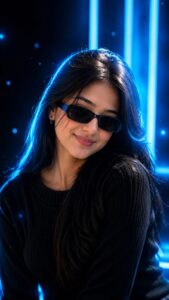
PROMPT- Use the uploaded reference image as the exact identity of the person.
STRICT IDENTITY LOCK
Preserve 100% facial structure, skin tone, hairstyle, beard, facial features, age, body proportions and identity from the uploaded reference image.
Do not alter face shape, eyes, nose, lips, jawline, beard style, hairstyle or natural appearance.
OUTFIT (FIXED)
Premium black ribbed knit sweater, sleek black rectangular sunglasses, small silver hoop earring in one ear, modern fashion styling.
POSE
Fashion portrait pose, head slightly lowered, face turned slightly sideways, confident expression, subtle smile, looking past camera.
SCENE
Futuristic blue neon fashion portrait, deep black and electric blue gradient background, glowing blue neon light bars, cinematic cyberpunk atmosphere, floating blue light particles, premium modern aesthetic, clean minimal composition, high-end professional photoshoot setup.
LIGHTING
Soft frontal beauty light,
dramatic electric blue rim light around hair and shoulders, editorial neon studio lighting, blue glow reflections on face, cinematic shadows, high contrast highlights, premium futuristic campaign look. CAMERA Chest-up close portrait, 85mm lens, f/1.8 aperture, shallow depth of field, extreme facial detail, sharp focus on face.
STYLE
Luxury men’s fashion editorial, Blue Neon Portrait DP aesthetic, viral Instagram portrait aesthetic, ultra realistic, high detail skin texture, professional DSLR photography, electric blue premium color grading, magazine-quality portrait, hyper realistic, futuristic celebrity look, highly detailed, in 4K quality. COLOR PALETTE Deep black, electric blue, neon cyan, cool futuristic highlights.
Aspect Ratio 9:16
How to Create Blue Portrait Photo AI
You can easily create your own Blue Portrait AI Photo by following these simple steps:
- Open Google Gemini or any AI image generation tool.
- Sign in using your Google account.
- Upload a clear and high-quality photo.
- Copy the Blue Portrait AI Prompt.
- Paste the prompt along with your image.
- Click on Generate and wait for 10 to 20 seconds.
- Download and save your edited photo.
That’s it! Your viral Blue Portrait AI Photo is ready.
Tips for More Realistic Blue Portrait Photos
To get the best results, keep these tips in mind:
•Use a high-resolution and clear portrait photo.
•Keep the prompt simple and specific.
•Add words like cinematic, ultra-realistic, 8K, soft lighting, and professional portrait.
•Choose a dark or clean background for better contrast.
•Slightly increase brightness and sharpness after generating the image.
These small improvements can make your AI portrait look much more realistic and professional.
Conclusion
We hope this article helped you understand Blue Portrait Photo AI Prompt easily. Blue-themed portrait edits are trending rapidly and are perfect for creating attractive social media content. By using the prompts and simple steps shared above, you can generate stunning AI portraits in just one click without any editing experience.
If you face any issues or want more AI photo editing prompts, you can comment below. We will try our best to help you. You can also check out tutorial videos on our YouTube channel Technical Sujit for complete step-by-step guidance.

Sani kumar Paswan