Hello friends, In today’s article we’re going to talk about a very emotional and trending AI editing style — “Childhood to Present AI Photo Editing Prompt.” This trend is going viral across Instagram Reels, YouTube Shorts, and Facebook because it beautifully shows your journey from childhood to your current look in one cinematic frame.
With the help of AI, you can now create this transformation without any advanced editing skills. Just upload your photo, use the right prompt, and the AI will generate a powerful, story-based image in seconds.
What is Childhood to Present AI Photo Editing?
Childhood to Present AI Editing is a creative style where your old childhood version and your present self are shown together in one image.
It often includes:
•Side-by-side transformation
•Walking from childhood into adulthood
•Holding hands with your younger self
•Mirror reflection effect (past vs present)
The result looks emotional, cinematic, and highly realistic — almost like a movie scene.
Why Is This Trend Going Viral?
There are a few strong reasons behind its popularity:
• Emotional connection — people love nostalgia
• Shows personal growth and journey
• Perfect storytelling for reels and shorts
• Highly shareable content
• Looks unique compared to normal edits
When people post these edits, viewers often comment things like “Which prompt did you use?” — this increases engagement and helps the trend grow faster.

PROMPT-
Using the images I’m going to upload to create a soft, emotional, black and white art.
Let the formation be as follows:
On the left: a child version of me (from a childhood photo) looking with an innocent smile to the right, with 2002 written above it.
On the right: A present version of me (from a recent photo) sits with her hands under her chin and looks at the child with a calm smile, with “2026” written above her.
In the middle: a table with a simple, elegant birthday cake with number 24 on top.
Studio background: plain and soft (studio background)
The lighting: Soft, cinematic, warm (even a black-and-white photo).
Style: Professional, minimal, emotional photography, focusing on feelings and visual communication between the two versions.
Make the picture look so real like a real photoshoot.
Keep my original features without changing.photo size 4:5
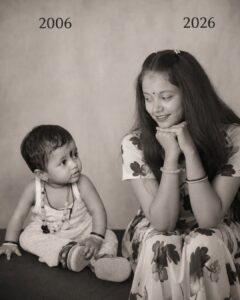
PROMPT-
Using the images I’m going to upload to create a soft, emotional, black and white art.
Let the formation be as follows:
n the left: a child version of me (from a childhood photo) looking with an innocent smile to the right, with 2002 written above it.
On the right: A present version of me (from a
recent photo) sits with her hands under her chin and looks at the child with a calm smile, with “2026” written above her.
In the middle: a table with a simple, elegant birthday cake with number 23 on top.
Studio background: plain and soft (studio background)
The lighting: Soft, cinematic, warm (even a black-and-white photo).
Style: Professional, minimal, emotional photography, focusing on feelings and visual communication between the two versions.
Make the picture look so real like a real photoshoot.
Keep my original features without changing.
photo size 4:5
How to Create Childhood to Present AI Photo
You can easily create your own transformation image by following these simple steps:
- Open Google Gemini or any AI image generator
- Sign in with your account
- Upload your current photo
- (Optional) Upload childhood photo for better accuracy
- Copy the prompt given below
- Paste it into the AI tool
- Click generate and wait for 10–20 seconds
- Download your final image
Tips for Best Results
To make your photo look more realistic and viral, follow these tips:
• Use a clear, high-quality photo
• Try similar face angles for better transformation
• Add keywords like cinematic, realistic, ultra-detailed
• Use emotional backgrounds like sunset, road, or childhood places
• Slightly adjust brightness and contrast after generation
These small changes can make a big difference.
Conclusion
Childhood to Present AI Photo Editing is not just a trend — it’s a powerful way to show your journey and memories in one frame. It connects emotionally with viewers and performs really well on social media.
By using the prompts and steps shared above, you can easily create your own transformation photo without any editing skills.

1 thought on “Childhood to Present AI Photo Editing Prompt (Trending 2026 Guide)”