If you want to create a beautiful Durga Puja AI video using AI tools, you can easily do it with the help of a simple AI video prompt. Nowadays, AI video generators can create cinematic devotional videos with beautiful scenes, lighting, decorations, and realistic details. In this article, I will share a Durga Puja AI Video Prompt that you can copy and use to create your own AI video.
What is Durga Puja AI Video Prompt?
A Durga Puja AI Video Prompt is a text instruction that tells an AI video generator what type of video you want to create. You can describe Maa Durga, the Durga Puja pandal, devotees, decorations, lights, flowers, and the overall festive atmosphere.
By using the right prompt, you can create a realistic and cinematic Durga Puja video for Instagram Reels, YouTube Shorts, Facebook, or other social media platforms.
Durga Puja AI Video Prompt
Copy the prompt given below and use it in your preferred AI video generator:
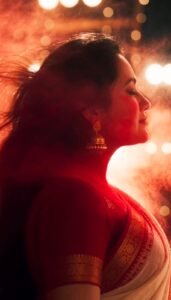
Create a 10-second cinematic, photorealistic vertical 9:16 Durga Puja video, using the provided character primary identity reference. The woman must remain the same person throughout the entire video — preserve her exact face, facial structure, skin tone, eyes, eyebrows, nose, lips, jawline, hairline and overall appearance with strong character consistency. Do not change or beautify her face. Character: A beautiful Bengali woman wearing a traditional red-and-white Bengali saree, traditional gold jewelry and bangles, with long open black hair. She holds a smoking dhunuchi during the celebration. Visual style: grand cinematic Durga Puja atmosphere, photorealistic Indian festival, rich warm golden lighting, volumetric dhunuchi smoke, realistic skin and fabric texture, shallow depth of field, cinematic lens, dramatic highlights, natural motion, subtle slow motion, high detail, realistic crowd movement, premium Indian film aesthetic. 0–2 sec — Reveal: Start from behind the woman. Her long open black hair fills much of the frame. She slowly turns toward the camera as thick dhunuchi smoke passes across her face, gradually revealing her eyes and expression. Warm golden Durga Puja lights glow through the smoke. 2–4 sec — Durga + Dhunuchi: Cut to a spectacular wide cinematic shot of a huge traditional Maa Durga idol decorated with flowers and lights. The woman stands in the foreground holding a smoking dhunuchi. She begins a powerful graceful dhunuchi dance. Dhaak players, dancers and devotees move in the background. 4–6 sec — Face Match Cut: Create dramatic smoke-filled match cuts: woman's face → Durga idol's face → woman's face → Durga idol's face. Keep the woman's identity perfectly consistent. Red-and-white sarees, flowers, lamps and drifting smoke create visual continuity. 6–8 sec — Festival Energy: Rapid cinematic montage: close-up of a dhaki striking a large traditional dhaak, woman's bangles and moving hands, swirling dhunuchi smoke, red rose petals falling from above, dancers performing dhunuchi dance, red-and-white sarees moving through the frame, warm lamps and intricate Durga idol details. 8–10 sec — Hero Ending: Slow-motion hero shot. The woman gracefully dances/walks toward the camera with the smoking dhunuchi while the gigantic Durga idol rises majestically behind her. Her long black hair moves naturally. Smoke, red petals and soft sindoor/gulal particles float through the warm golden light. Camera slowly pulls back and reveals the full grand Durga Puja celebration — dancers, devotees, dhaak players, flowers and illuminated decorations. Camera & motion: cinematic handheld-to-stabilized movement, smooth dolly-in, subtle orbit, slow-motion moments, fast match cuts, realistic depth of field, natural motion blur, dramatic composition. Audio: powerful traditional Bengali dhaak, festive crowd ambience, devotional Durga Puja atmosphere, rhythmic percussion, subtle conch sound and bells. Build intensity toward the final hero shot. Important: Maintain the exact same woman and facial identity in every shot. No face morphing, no identity changes, no hairstyle changes, no extra fingers or distorted hands, no duplicate woman, no cartoon/anime look, no artificial plastic skin. Keep the Durga idol traditional, majestic and culturally authentic. Output: 10 seconds, vertical 9:16, cinematic photorealism, high detail, realistic lighting, seamless transitions, premium festival-film look.
How to Create Durga Puja AI Video
Creating a Durga Puja AI video is very simple. First, copy the above prompt and open an AI video generation tool that supports text-to-video or image-to-video generation.
If you are using an image-to-video tool, first create or upload a suitable Durga Puja image. Then paste the prompt and generate the video.
You can also change different parts of the prompt according to your requirements. For example, you can create a Durga Puja pandal video, Maa Durga cinematic video, devotional reel, festival celebration video, or realistic Durga Puja scene.
Create a Viral Durga Puja Reel
For Instagram Reels and YouTube Shorts, use a vertical 9:16 aspect ratio. Keep the camera movement smooth and add cinematic effects to make the video more attractive.
You can also add devotional music, traditional Durga Puja sounds, bells, dhak beats, and other festival elements during editing.
Conclusion
With the help of AI, you can create beautiful and realistic Durga Puja AI videos without recording an actual festival scene. Just use a good prompt, generate the video, and edit the final result with music and effects.
If you are looking for a Durga Puja AI Video Prompt, you can copy the prompt from this article and use it to create your own cinematic Durga Puja video.
