Karwa Chauth Ai Video Editing Prompt

Karwa Chauth is one of the most beautiful and romantic festivals celebrated by married couples in India. On this special day, women dress in traditional outfits, apply mehndi, perform puja, and look at the moon through a chalni before breaking their fast. Now, with the help of AI, you can turn your normal photos into beautiful Karwa Chauth cinematic videos.

In this article, I am going to share the Karwa Chauth AI Video Editing Prompt that you can use to create realistic and festive videos from your own photo. You do not need professional video editing skills. You only need your photo, the correct AI prompt, and an AI video generator.

What is Karwa Chauth AI Video Editing?

Karwa Chauth AI Video Editing is a simple method where artificial intelligence converts your photo into a realistic moving video. You can create scenes like looking at the moon through a chalni, holding a decorated puja thali, smiling with your partner, or standing on a beautifully decorated terrace.

AI can automatically add natural body movement, cinematic camera motion, glowing diyas, moonlight, moving clothes, and realistic facial expressions. This makes your normal photo look like a professionally recorded Karwa Chauth video.
◀ OSM TEMPLATE
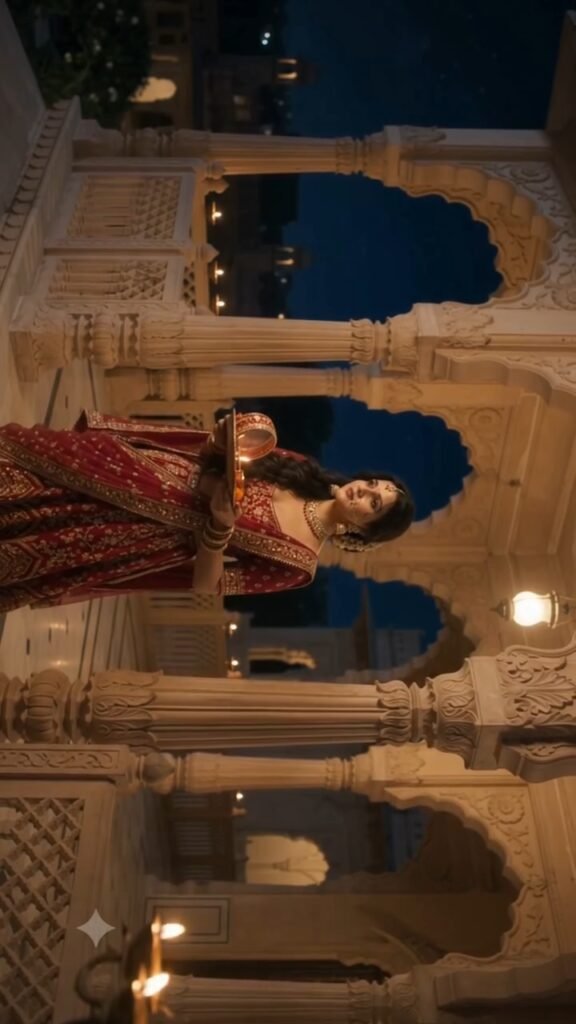
ULTRA-REALISTIC BOLLYWOOD KARWA CHAUTH CINEMATIC VIDEO — 10 SECONDSFORMAT: 10-second video, 16:9 horizontal, 4K cinematic quality, photorealistic live-action, natural real-time motion.1. STRICT FACE IDENTITY & REALISM LOCKUse the uploaded female portrait as the ONLY source of facial identity. Carefully analyze the reference photograph before generating the video, including the exact face shape, forehead, eyes, eyebrows, nose, lips, cheeks, jawline, skin tone, natural asymmetry, and distinctive facial features.Reproduce the same real person’s face with maximum identity accuracy in every frame. The generated woman must look like the actual person from the uploaded photograph, naturally present in a real cinematic environment.Preserve authentic human skin texture, visible natural pores, realistic skin details, subtle facial imperfections, natural under-eye texture, and physically accurate facial proportions. Maintain the original person’s age appearance and natural facial characteristics.IMPORTANT: The face must look like a real human filmed with a professional cinema camera, NOT an AI-generated face, cartoon, painting, 3D model, or beauty-filtered portrait.No artificial beautification, no face reshaping, no excessive skin smoothing, no plastic skin, no doll-like eyes, no waxy texture, and no identity changes between frames.Facial identity must remain consistent during head movement, changing camera angles, different lighting conditions, and close-up shots.2. STORYBOARD & SCENE PRESERVATIONUse the uploaded storyboard image as the exact visual reference for the scene composition, palace architecture, carved pillars, decorative balcony, nighttime atmosphere, warm golden lamps, full moon, character placement, traditional red-and-gold outfit, jewelry, puja thali, decorated sieve, and overall visual style.Do not copy the woman’s face from the storyboard. Use the uploaded portrait exclusively for her facial identity.Preserve the original red traditional outfit, embroidered dupatta, gold jewelry, earrings, necklace, bangles, maang tikka, and other visible accessories.Maintain consistent character proportions, hairstyle, makeup, lighting, and background across all four shots.3. SHOT-BY-SHOT DIRECTION — EXACTLY 10 SECONDSSHOT 1 — 0.0–2.5 SECONDS | PUJA THALI CLOSE-UPBegin with a realistic three-quarter close-up of the woman arranging the puja thali. Show her hands, traditional bangles, glowing diya, and ritual items in fine detail.Her gaze remains directed toward the thali. Use a gentle sideways camera movement, warm practical lighting, realistic shadows, and natural depth of field.Her hands and fingers must move naturally, with realistic anatomy and believable physical contact with the objects.SHOT 2 — 2.5–5.0 SECONDS | PALACE PORTRAITMake a clean cinematic cut to a medium-wide shot of the woman standing gracefully in the palace, holding the same puja thali at waist level.Slowly track the camera from her front-left toward a three-quarter frontal angle.Keep her facial identity, outfit, jewelry, body proportions, and the palace environment consistent with the references.Use realistic fabric movement, natural posture, and subtle human body motion.SHOT 3 — 5.0–7.5 SECONDS | MOON AND SIEVECut to a medium close-up from a slight side angle. Show the full moon clearly in the deep blue night sky beyond the balcony.The woman slowly raises the decorated sieve toward the moon with anatomically correct hand, wrist, elbow, and shoulder movements.Use balanced golden palace lighting and cool moonlight. Preserve realistic facial details and the correct spatial relationship between the woman, sieve, balcony, and moon.SHOT 4 — 7.5–10.0 SECONDS | REALISTIC FACE CLOSE-UPCut to a cinematic three-quarter close-up of the woman looking through the decorated sieve.Her face must remain clearly recognizable as the exact person in the uploaded portrait.Show authentic skin pores, realistic eyes, natural eyelashes, fine facial details, accurate skin color, and physically realistic jewelry reflections.The sieve’s red-and-gold embroidered rim remains visible around her face.Perform a gentle forward camera push-in while preserving her facial proportions and natural expression.At exactly 10 seconds, end with the woman still holding the sieve in front of her face and looking through it. Keep the final pose stable and suitable for seamless video continuation.4. PHOTOREALISTIC CINEMATOGRAPHYCreate the appearance of a real Bollywood romantic drama filmed using a professional cinema camera.Use natural human movement, realistic skin rendering, physically accurate lighting, subtle camera movement, natural depth of field, detailed fabric textures, and realistic environmental shadows.The face must retain natural human characteristics in every frame. Avoid excessive sharpness, artificial HDR, beauty filters, overprocessed skin, and exaggerated cinematic effects.Maintain consistent facial identity, exposure, white balance, outfit, jewelry, and background geometry throughout the video.5. STRICT NEGATIVE CONSTRAINTSNo cartoon face, no animated appearance, no CGI-looking skin, no artificial AI face, no plastic skin, no doll-like eyes, no face morphing, no identity drift, no facial blending, no face reshaping, no excessive beauty filters, no skin whitening, no unnatural facial symmetry, no blurry facial details, no flickering face, no inconsistent eyes, no changing nose or lips, no distorted hands, no extra fingers, no floating objects, no outfit changes, no jewelry changes, no background changes, no excessive camera shake, no random camera orbit, no rapid zoom, no slow motion, no subtitles, no text, no logos, no watermark, no dialogue, and no music.FINAL PRIORITY1. Exact facial identity from the uploaded portrait. 2. Photorealistic human face and natural skin texture. 3. Accurate storyboard composition and scene continuity. 4. Natural body movements and cinematic realism. 5. Exactly 10 seconds with a stable final sieve-framed close-up.The final result must look like a real woman filmed in a real palace at night, with her actual facial identity preserved as faithfully as possible. Never sacrifice facial realism for cinematic effects.

How to Create Karwa Chauth AI Video

First, select a clear and high-quality photo. A full-body or half-body photo usually gives better results because the AI gets enough information about the person and outfit.

Now open your preferred AI video generator and upload your photo. After uploading the image, paste the Karwa Chauth AI video prompt into the prompt box.

The prompt should clearly describe the movement you want in the video. For example, the woman can slowly raise the chalni toward the moon, look through it, smile softly, and then look toward her husband. You can also add instructions for cinematic lighting, realistic movement, traditional Indian decorations, and smooth camera motion.

After entering the prompt, generate the video. AI may take a little time to process the image. Once the video is ready, preview it and download the best result.

Karwa Chauth AI Video Prompt

You can create different types of videos such as a woman performing Karwa Chauth puja, a romantic couple scene, moon-viewing animation, or cinematic terrace celebration.

For the best result, your prompt should include details about the outfit, facial expression, camera movement, background, moonlight, diya lighting, and natural hand movements.

Also mention that the person’s face, hairstyle, clothes, and identity should remain consistent throughout the video. This helps prevent unwanted changes during AI video generation.

Where to Get the Karwa Chauth AI Video Prompt?

If you want to use the ready-made prompt, search OSM Template on Google and open our website. Find the Karwa Chauth AI Video Editing Prompt post and copy the prompt from there.

After copying the prompt, open your AI video editing tool, upload your photo, paste the prompt, and generate your video.

Conclusion

Karwa Chauth AI Video Editing is an easy way to create beautiful festival videos without complicated editing. With one photo and a detailed AI prompt, you can create romantic, cinematic, and realistic Karwa Chauth videos for Instagram Reels, YouTube Shorts, WhatsApp Status, and other social media platforms.

Leave a Reply

Your email address will not be published. Required fields are marked *