Hello friends, in today’s article we are going to share everything about Travel Photo Ai Prompt, absolutely free. Using these AI prompts, you can create stunning travel photos and cinematic videos with your own picture in just one click. These edits are currently trending on Instagram, Facebook, and YouTube Shorts because they look professional, realistic, and visually attractive.
In this article, we will explain what Travel Photo Ai Prompt is, why it is becoming viral, how you can create it using AI tools like Google Gemini, and we will also provide ready-to-use AI prompts that you can simply copy and paste. Make sure you read this article till the end without skipping.
Travel Photo Ai Prompt
Travel Photo Ai Prompt is a trending AI photo editing style where your image is transformed into a cinematic travel scene. AI can place you in famous destinations, mountains, beaches, city streets, airports, deserts, or luxury vacation spots while maintaining your real face and appearance.
The final image looks like it was captured by a professional travel photographer during an expensive world tour. With AI tools, you don’t need Photoshop skills or expensive cameras. Simply upload your photo, paste a prompt, and let AI generate a realistic travel photo automatically.
Why Is Travel Photo Ai Prompt Going Viral on Social Media?
There are several reasons why Travel Photo AI edits are becoming viral on social media:
• Travel-themed photos always attract attention
• Cinematic locations create a premium look
• No expensive trips or photoshoots are needed
• AI generates realistic results within seconds
• Perfect for Instagram posts, reels, and YouTube Shorts
• People love seeing themselves in dream destinations
When users upload these travel-style photos, they often receive more likes, shares, and comments, making the trend grow even faster.
How to Edit Travel Photo Using AI
You can easily create Travel Photo AI edits by following these simple steps:
- Open Google Gemini or any AI photo editing tool
- Sign in using your Google account
- Upload your clear photo
- Copy a Travel AI Prompt
- Paste the prompt along with your photo
- Click Generate
- Wait for 10 to 20 seconds
- Download and save your edited image
That’s it. Your cinematic Travel AI Photo is ready.
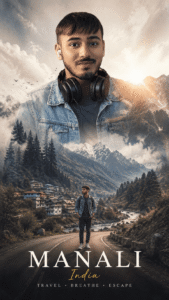
PROMPT- Analyze the uploaded image first and intelligently adapt the composition, scenery, colors, lighting, subject placement, camera angle, clothing mood, and environmental elements according to the original photo.
Create a cinematic DOUBLE EXPOSURE travel poster using the uploaded image while preserving the real identity, face structure, hairstyle, body pose, skin tone, and clothing details of the person.
The AI should automatically detect:
subject pose
viewing direction
outfit style
mood of image
lighting direction
travel vibe
camera framing
environment suitability
Then dynamically generate matching travel elements and compositions that naturally fit the image.
STYLE:
Ultra realistic cinematic double exposure, emotional travel storytelling, luxury tourism campaign aesthetic, realistic photo compositing, dreamy atmosphere, premium poster design, high-end editorial photography, soft fog, cinematic depth, layered landscapes, realistic blending.
SMART COMPOSITION RULES:
If subject is looking sideways → add mountains/roads/horizon in viewing direction.
If subject is standing → create full scenic landscape body blend.
If subject is sitting → create calm reflective storytelling composition.
If outfit looks winter/travel oriented → add snowy mountains, fog, pine forests.
If outfit looks casual/summer → add valleys, rivers, tropical roads, sunsets.
If image lighting is warm → use golden cinematic grading.
If image lighting is cool → use misty blue atmospheric grading.
If background is simple → create clean white luxury poster background.
If pose is dramatic → enhance cinematic depth and scale.
SCENERY GENERATION:
Automatically generate and blend suitable:
mountains
rivers
winding roads
forests
clouds
fog
lakes
valleys
waterfalls
temples/cabins/villages
birds
travel vehicles (bike/car/jeep if composition suits)
DOUBLE EXPOSURE EFFECT:
Blend landscapes seamlessly inside the body silhouette with realistic transparency, atmospheric fog crossing through body edges, depth layering, natural shadows, and smooth compositing.
SECONDARY SUBJECT:
Add a smaller realistic version of the same person near bottom area interacting with the landscape naturally:
standing near road
beside bike
overlooking valley
walking through scenery
TYPOGRAPHY:
Automatically place elegant cinematic text based on composition:
“[MANALI]”
“[HIMACHAL PRADESH]”
“TRAVEL • BREATHE • ESCAPE”
Typography should look minimal, luxury, cinematic, and professionally designed.
COLOR GRADING:
Adaptive cinematic grading based on original image tones:
earthy greens
foggy whites
mountain blues
warm sunset tones
moody shadows
soft atmospheric contrast
QUALITY:
Hyper realistic, ultra detailed, seamless blending, realistic textures, volumetric lighting, premium travel advertisement quality, 8K cinematic poster.
NEGATIVE PROMPT:
cartoon, low quality, distorted face, extra limbs, unrealistic blending, bad anatomy, oversaturated colors, messy composition, artificial AI artifacts, blurry face, duplicate subject, flat lighting.
OUTPUT:
Vertical cinematic travel poster, 9:16 aspect ratio
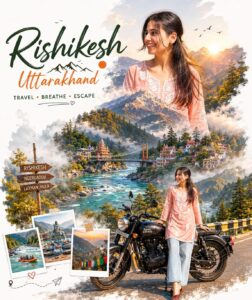
PROMPT- Create a cinematic double-exposure travel poster for “Rishikesh, Uttarakhand” using my uploaded photo.
Keep the same face, pose, outfit, and natural features unchanged.
Blend Himalayan valleys, pine forests, misty mountains, winding roads, rivers, and clouds inside the portrait silhouette.
Add a small full-body version beside a bike on a mountain road.
Style: luxury Himalayan tourism campaign, dreamy matte tones, soft fog, atmospheric depth, realistic blending, minimal typography, clean white background, ultra-realistic editorial aesthetic.
Text:
“Rishikesh”
“Uttarakhand”
“TRAVEL • BREATHE • ESCAPE” don’t change face
Tips for More Realistic Travel Photos
To get the best results, keep these tips in mind:
• Use a high-quality portrait photo
• Choose a photo with good lighting
• Add words like cinematic, realistic, ultra-detailed, travel photography
• Use famous landmarks or beautiful natural locations
• Maintain natural facial details for realistic output
• Slightly enhance brightness and contrast after generation
These small adjustments can significantly improve the final result.
Conclusion
We hope this article helped you understand Travel Photo Ai Prompt easily. Travel AI photo edits are one of the fastest-growing trends on social media and are perfect for creating eye-catching content. By using the prompts and steps shared above, you can create professional travel photos in just one click without any editing skills.
If you face any issues or want more AI photo and video editing prompts, you can comment below. We will try our best to help you. You can also check out tutorial videos on our YouTube channel Technical Sujit for step-by-step guidance.

2 thoughts on “Travel Photo Ai Prompt”