Trending All Video Prompt

AI video editing is becoming one of the biggest trends on Instagram, YouTube Shorts, and other social media platforms. Every day, new AI videos go viral with cinematic effects, realistic movements, funny actions, dance styles, photo-to-video transformations, and creative scenes. If you also want to create these types of videos, then Trending All Video Prompt can make the process much easier.

In this post, we are sharing different types of trending AI video prompts in one place. You can use these prompts to turn your normal photos into attractive and realistic AI videos. Whether you want to create a cinematic video, funny video, couple video, dance video, attitude video, festival video, or any other trending Reel, you can choose the required prompt from this post.

What is a Trending AI Video Prompt?

An AI video prompt is a detailed text instruction that tells an AI video generator how your video should look and move. The prompt can describe the character’s actions, facial expressions, body movement, camera angle, background, lighting, video style, and other important details.

A well-written prompt helps the AI understand exactly what you want. This is especially useful when you are creating a video from your own photo and want to maintain the person’s face and overall appearance.
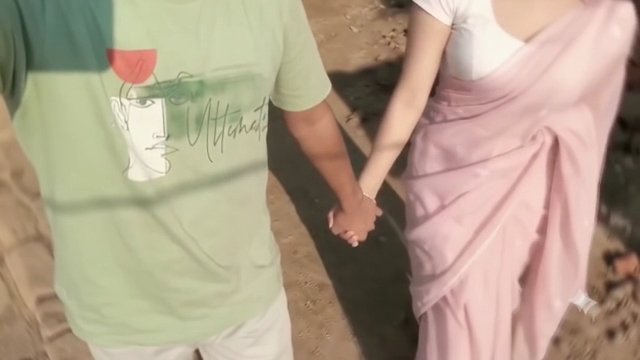
GIRLFRIEND VIDEO EDITING
◀ GIRLFRIEND PROMPT
Create a highly realistic 9:16 vertical video by transferring the EXACT motion, performance and camera moverment from the REFERENCE VIDEO onto the person shown in the TARGET Picture

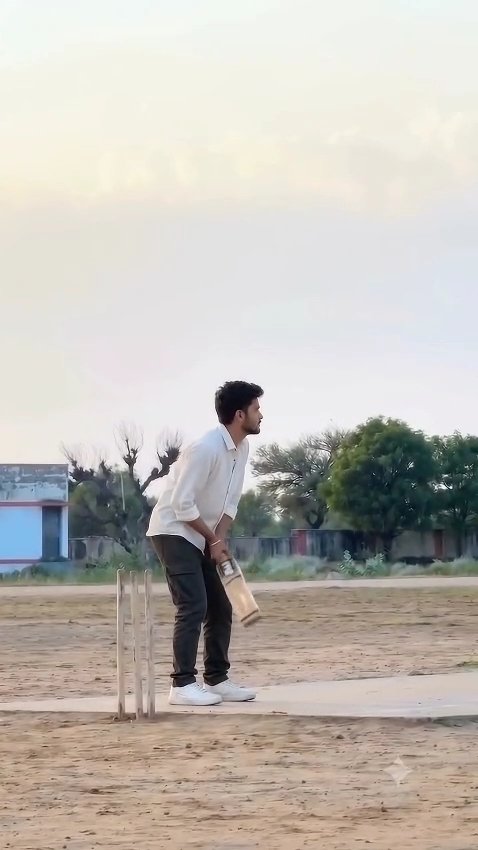
◀ CRICKET BOY PROMPT
Cinematic 9:16 vertical video, exactly 11.5 seconds, photorealistic, 8K, true HDR, 24 fps. Silent video, no music, no speech.CAMERA AND FRAMING (must not change): a locked-off tripod camera at chest height, looking straight ahead, perfectly horizontal, a pure side view of the pitch. The camera is square-on to the pitch, not behind the stumps, not behind the bowler, not at an angle. It never moves, zooms, pans or tilts. Wide shot: the top 45 percent of the frame is soft sky, the tree line sits about two thirds down the frame, and the man fills only about one third of the frame height, always fully visible head to feet. He stands left of centre, at about 40 percent of the frame width, and stays in that spot until the final walk.GROUND LAYOUT (must not be reversed or rotated): a grey concrete strip runs horizontally across the lower part of the frame, from the left edge to the right edge, with brown sandy ground in front of it at the bottom. Only one set of three wooden stumps stands at the left end of the strip, at about 28 percent of the frame width, directly behind the man. He stands in front of the stumps in a side-on batting stance, facing frame-right, towards the open pitch. A small blue-and-white building stands at the far left edge, a bare leafless tree is behind it, and green trees and a low wall run along the horizon on the right. No other stumps, no vertical pitch, no second batter.MAN: he looks exactly like the uploaded photo in every frame. Outfit: plain white t-shirt, black pants, white sneakers. He holds a light-wood cricket bat with a blue-and-white sticker. No other people. His face is sharp and clear whenever visible, no blur, evenly lit.COLOUR: 0-7.5s warm bright golden-hour tones, soft cream-and-grey pastel sky, crisp white t-shirt. From 7.5s to 10.2s the frame turns slightly darker, cooler and greenish-grey. At the cut at 10.2s the warm bright tones return and stay. Bright clean highlights, detailed shadows, 10-bit HDR, no haze.SPEED (very important): everything from 0s to 5.9s is in normal real-time speed, including the batting shot, which is fast and powerful, NOT slow motion. Only from 5.9s to 8.9s (exactly 3 seconds) it is smooth slow motion (about 40 percent speed) with hair, t-shirt and bat floating. From 8.9s to 11.5s it is normal real-time speed again.ACTION, in this order: 0-2.3s: he stands side-on facing frame-right in front of the stumps, bent slightly forward, raises the bat upright in front of him, then lowers it to hang by his hip, head down. 2.3-3.8s: he slowly lifts the bat into a high back-lift behind his shoulder, leaning back, then leans forward and drops the bat down. 3.8-4.8s: he taps the bat blade on the ground at his feet, bends forward with his hair falling forward, then lifts the bat again into a high back-lift. 4.8-5.2s: he holds the high back-lift with his knees slightly bent. 5.2-5.9s (THE SHOT, real-time, fast): he springs off the ground with the bat upright in front of him, spins his body so his back is to the camera, whips the bat around in a fast arc and up overhead, his hair flung upward, ending with one leg kicked out to the left and both hands holding the bat overhead. 5.9-7.0s (slow motion): he hangs in the air with one leg out to the left, the bat held up overhead, his hair flying to the right and the t-shirt floating. 7.0-7.8s (slow motion): he lands slowly, one leg still out to the side, the bat diagonal above his head, turning toward the camera. 7.8-8.9s (slow motion): he faces the camera three-quarter, the bat raised high in his right hand, his left hand on his chest, the t-shirt floating. 8.9-10.2s (real-time): he holds the bat upright in front of his face with both hands so the blade covers his face, then tilts it diagonally. 10.2-11.5s (hard cut, same camera position): he lowers the bat to his right side with his face visible, steps toward frame-right along the strip, turns to profile with the bat hanging behind him, then turns his back to the camera and walks away, his hair and t-shirt swaying.Smooth stable motion, no warping or flicker, correct hands.
◀ CRICKET GIRL PROMPT
CINEMATIC GIRL CRICKET VIDEO — 9:16 VERTICALCreate a cinematic, photorealistic 9:16 vertical video, exactly 11.5 seconds long, 8K quality, true HDR, 24 fps. Silent video with no music and no speech.CAMERA AND FRAMING (MUST NOT CHANGE): A locked-off tripod camera at chest height, looking straight ahead, perfectly horizontal, showing a pure side view of the cricket pitch. The camera is square-on to the pitch, not behind the stumps or bowler, and not at an angle. The camera never moves, zooms, pans, or tilts.Wide shot: the top 45 percent of the frame contains a soft sky. The tree line sits about two-thirds down the frame. The girl occupies approximately one-third of the frame height and remains fully visible from head to feet. She stands left of centre, at about 40 percent of the frame width, and stays in that position until the final walking sequence.GROUND LAYOUT (MUST NOT BE REVERSED OR ROTATED): A grey concrete cricket strip runs horizontally across the lower part of the frame, from the left edge to the right edge, with brown sandy ground in front of it at the bottom.Only one set of three wooden cricket stumps stands at the left end of the strip, at approximately 28 percent of the frame width, directly behind the girl.She stands in front of the stumps in a side-on batting stance, facing frame-right towards the open pitch.A small blue-and-white building stands at the far left edge. A bare, leafless tree is behind it. Green trees and a low wall run along the horizon on the right.No additional stumps, no vertical pitch, no second batter, and no other people.GIRL’S APPEARANCE AND OUTFIT: Use the uploaded female reference photo to preserve the girl’s exact facial identity, facial features, skin tone, hairstyle, and overall appearance in every frame.She wears a stylish plain white fitted t-shirt, black straight-leg pants, and clean white sneakers. Her outfit is casual, sporty, and realistic, suitable for playing cricket.Her hair is naturally styled and moves realistically with her body during the jump and cricket swing.She holds a realistic light-wood cricket bat with a blue-and-white sticker.Her face must remain sharp, clear, and consistent whenever visible. No facial distortion, no identity changes, no blur, and no flickering. Her hands must remain anatomically correct throughout the video.COLOUR AND LIGHTING: From 0 to 7.5 seconds, use warm, bright golden-hour tones with a soft cream-and-grey pastel sky and a crisp white t-shirt.From 7.5 to 10.2 seconds, the frame becomes slightly darker, cooler, and greenish-grey.At exactly 10.2 seconds, make a hard cut and immediately restore the warm, bright golden-hour tones. Keep these warm tones until the end.Bright, clean highlights, detailed shadows, realistic skin texture, 10-bit HDR, no haze, and cinematic photorealism.SPEED (VERY IMPORTANT): From 0 to 5.9 seconds, everything moves at normal real-time speed. The cricket action must be fast and powerful, NOT slow motion.From 5.9 to 8.9 seconds, use smooth slow motion at approximately 40 percent speed, lasting exactly 3 seconds. Her hair, t-shirt, and cricket bat should move naturally with realistic floating motion.From 8.9 to 11.5 seconds, return to normal real-time speed.ACTION TIMELINE — FOLLOW EXACTLY:0.0–2.3 seconds: The girl stands side-on, facing frame-right, directly in front of the stumps. She bends slightly forward and raises the cricket bat upright in front of her body. She then lowers the bat until it hangs naturally beside her hip, with her head tilted slightly downward.2.3–3.8 seconds: She slowly lifts the bat into a high back-lift behind her shoulder, leaning her upper body slightly backward. She then leans forward and brings the bat down in a controlled, natural movement.3.8–4.8 seconds: She taps the blade of the bat against the ground near her feet. She bends forward slightly as her hair falls naturally towards her face, then raises the bat again into a high back-lift.4.8–5.2 seconds: She holds the high back-lift position with her knees slightly bent, maintaining a balanced batting stance.5.2–5.9 seconds — FAST CRICKET ACTION, REAL-TIME SPEED: She springs off the ground while bringing the bat upright in front of her body. She rapidly rotates her body until her back faces the camera, then whips the bat around in a fast, powerful arc and raises it overhead.Her hair flies upward naturally from the momentum. She finishes the movement with one leg kicked out towards frame-left and both hands gripping the bat overhead.The jump, body rotation, and bat swing must happen quickly and dynamically at normal speed, without slow motion.5.9–7.0 seconds — SLOW MOTION: She appears suspended in the air with one leg extended towards frame-left and the bat held overhead.Her hair flows towards frame-right, and her white t-shirt floats naturally with the movement. Preserve realistic body proportions and smooth cinematic motion.7.0–7.8 seconds — SLOW MOTION: She lands gradually, keeping one leg extended to the side. The bat remains diagonally above her head as she begins turning her upper body towards the camera.Her landing must feel physically realistic, with natural balance and body movement.7.8–8.9 seconds — SLOW MOTION: She turns to a three-quarter position facing the camera. She raises the bat high in her right hand and places her left hand gently against her chest.Her t-shirt and hair continue floating naturally before settling. Maintain her exact facial identity and realistic anatomy.8.9–10.2 seconds — REAL-TIME SPEED: She brings the bat upright in front of her face and holds it with both hands so that the bat blade covers her face.She then tilts the bat diagonally in a smooth, controlled movement.10.2–11.5 seconds — HARD CUT, SAME CAMERA POSITION: Make a hard cut while keeping the exact same camera angle, framing, and ground layout.The warm golden-hour lighting returns immediately.The girl lowers the bat to her right side, revealing her face clearly. She steps towards frame-right along the concrete cricket strip, turns into a side profile with the bat hanging naturally behind her, then turns her back to the camera and walks away.Her hair and t-shirt sway naturally as she walks. The cricket bat remains in her hand and moves realistically with each step.MOTION QUALITY AND FINAL RESTRICTIONS: Smooth, stable, physically realistic movement. No warping, no flickering, no sudden body-shape changes, no extra limbs, no deformed hands, no face distortion, and no identity changes.Maintain the exact same girl throughout the video.Keep the camera completely stationary. Do not reverse or rotate the cricket pitch layout. Do not add additional people, extra stumps, or new objects.No text, no captions, no watermark, no logos, and no usernames anywhere in the video.

Trending All Video Prompts in One Place

Instead of searching for different prompts again and again, you can find multiple trending video prompts on this page. We will keep adding prompts for popular and viral AI video editing trends.

You can find prompts for cinematic videos, viral Instagram Reels, funny AI videos, dance videos, photo animation, couple videos, attitude videos, festival videos, realistic action scenes, trending transitions, and many other creative AI video styles.

Simply choose the video style you want to create and copy its prompt.

How to Create an AI Video Using a Prompt

Creating an AI video is very simple. First, choose the trending video prompt you want to use from this post. Copy the complete prompt and open your preferred AI video generator.

Upload your photo or reference image. If the AI tool supports reference videos, you can also upload a reference video for better motion and scene accuracy. After uploading the required files, paste the copied prompt into the prompt box.

Select the appropriate video ratio, such as 9:16 for Instagram Reels and YouTube Shorts, and start generating the video. The AI will process your photo and prompt to create the final video.

Once your video is ready, preview it carefully. If everything looks good, download the video and use it for your Instagram Reel, YouTube Short, or other social media content.

Tips for Better AI Video Results

Always use a clear and high-quality reference photo where the person’s face is properly visible. Avoid blurry, dark, or heavily edited photos because they can affect face consistency.

For realistic results, your prompt should clearly describe the movement, camera position, lighting, background, and character actions. If you are using a reference video, try to select a video with clear movements and an unobstructed subject.

For Reels and Shorts, a vertical 9:16 video format usually works best.

Why Are AI Video Prompts Trending?

AI video tools have made it possible to create creative videos without professional cameras, complicated editing software, or advanced editing skills. A single photo and a detailed prompt can now be used to create impressive video scenes within minutes.

This is why AI-generated videos are becoming increasingly popular among Instagram creators, YouTubers, editors, and social media users. New trends appear frequently, and using the right prompt makes it much easier to recreate them.

Conclusion

If you are looking for Trending All Video Prompt, this post will help you find different viral AI video prompts in one place. Choose your favorite trend, copy the prompt, upload your photo to an AI video generator, and create your own version of the trending video. We will continue adding new and trending AI video prompts so you can easily try the latest Instagram Reels and YouTube Shorts trends. Save this page and check it regularly for new AI video editing prompts.

Leave a Reply

Your email address will not be published. Required fields are marked *