Trending Wallpaper Ai Prompt

Are you looking for a Trending Wallpaper AI Prompt to create beautiful, unique, and eye-catching wallpapers? With the help of AI tools like ChatGPT, you can create amazing wallpaper images for your mobile screen, desktop background, or social media posts. You don’t need professional editing skills to get started.

In this article, you will learn how to use trending wallpaper AI prompts to create high-quality wallpapers with your own creative ideas.

What Is a Trending Wallpaper AI Prompt?

A trending wallpaper AI prompt is a text description that tells an AI image generator how to create a specific wallpaper. You can describe the background, colours, lighting, objects, style, and image quality to get your desired result.

For example, you can create aesthetic wallpapers, 3D backgrounds, nature wallpapers, cinematic designs, futuristic themes, or stylish 4K mobile wallpapers using the right prompt.

How to Create Trending Wallpapers Using ChatGPT

Follow these simple steps to generate your own AI wallpaper.

  1. Open ChatGPT on your mobile phone or computer.
  2. Open the image generation feature and enter your favourite wallpaper prompt.
  3. Mention your preferred colours, style, background, and aspect ratio.
  4. Send the prompt and wait for the AI to generate your wallpaper.
  5. Review the result and make changes to the prompt if needed.
  6. Download the generated image and set it as your mobile or desktop wallpaper.

Tip: For a mobile wallpaper, try a 9:16 vertical composition. For a desktop wallpaper, use a 16:9 horizontal composition. You can also mention 4K quality and realistic details to guide the image generator.
◀ OSM TEMPLATE
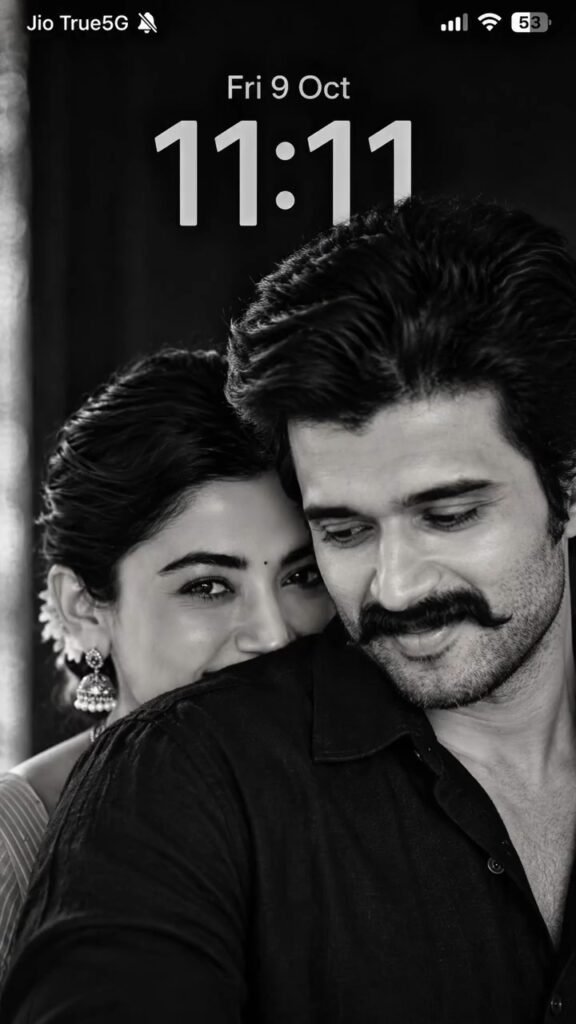
Ultra-Realistic Black & White Couple iPhone Lock Screen (STRICT 9:16) REFERENCE IMAGE INSTRUCTIONS Use the uploaded iPhone lock-screen screenshot as the STRICT COMPOSITION AND UI REFERENCE. Use the uploaded boy’s and girl’s photographs as STRICT FACIAL IDENTITY REFERENCES. Create an ultra-realistic black-and-white couple portrait displayed as a complete iPhone-style lock-screen screenshot in an EXACT 9:16 VERTICAL ASPECT RATIO. 1. STRICT FACIAL IDENTITY PRESERVATION Preserve both individuals’ recognizable facial identities, natural facial structures, eyes, eyebrows, noses, lips, jawlines, skin textures, ages, and natural asymmetry. Do not merge faces, swap identities, reshape facial features, or apply excessive beauty filters. 2. EXACT COUPLE COMPOSITION – Man prominently positioned in the foreground on the right. – Woman positioned slightly behind him on the left. – Man looking downward with a subtle natural smile. – Woman looking toward the camera with expressive eyes. – Woman’s lower face partially concealed behind the man’s raised shoulder and black shirt collar. – Man wearing a dark black collared shirt. – Woman with long, dark, voluminous hair and subtle traditional earrings. – Both faces positioned close together. – Man’s shoulder occupies much of the lower foreground. – Preserve the original reference’s intimate close-up composition. IMPORTANT 9:16 COMPOSITION ADJUSTMENT Adapt the reference composition naturally to the shorter 9:16 canvas. Do not stretch, distort, or artificially resize the subjects. Keep the couple centered in the middle and lower portions of the image. Slightly adjust the camera crop and background spacing to accommodate the 9:16 format while preserving both faces and the woman’s partially hidden expression. 3. AUTHENTIC BLACK & WHITE PHOTOGRAPHY Entire image must be pure monochrome black and white. Deep charcoal blacks, silver-gray highlights, realistic natural skin texture, individual hair strands, subtle film grain, soft cinematic shadows, and a dark understated background. Professional 85mm portrait photography, shallow depth of field, natural facial details, and cinematic directional lighting. No color, sepia, cartoon effects, illustration, or artificial skin smoothing. 4. COMPLETE IPHONE STATUS BAR Reproduce the complete iPhone-style status bar at the top of the 9:16 image. Top-left: – Exact white text: “Jio True5G” – Small white muted-bell/silent-mode icon immediately after the carrier text. – Authentic iOS-style typography. – Natural horizontal margins and spacing. Top-right: – White cellular signal bars. – White Wi-Fi symbol. – Rounded white battery icon. – Exact battery percentage: “53” inside the battery icon. All status icons must be clearly visible, correctly aligned, proportionally sized, and integrated naturally into the screenshot. 5. EXACT DATE AND LOCK-SCREEN CLOCK Date: – Display exactly: “Fri 9 Oct” – Center horizontally below the status bar. – White iOS-style font. – Medium weight with natural spacing. Clock: – Display exactly: “11:11” – Large, centered iPhone-style lock-screen typography. – Light silver-gray appearance. – Subtle translucent glass-like effect. – Clean numerals with realistic spacing and proportions. The date and clock must be actual visible graphic elements, not merely implied. 6. STRICT 9:16 SCREEN LAYOUT – Aspect ratio: EXACT 9:16. – Target resolution: 1080 × 1920 pixels, or 1440 × 2560 pixels. – Full-bleed edge-to-edge screenshot. – No phone frame, borders, padding, or letterboxing. – Status bar positioned at the top. – Date directly below the status bar. – Large clock directly below the date. – Couple’s hair begins behind or slightly below the clock area. – Couple’s faces dominate the middle and lower sections. – Keep the upper background sufficiently dark for white UI readability. – Maintain natural head sizes and facial proportions. – Do not cut off important facial features. 7. REALISTIC IPHONE LOCK-SCREEN SCREENSHOT The final output must look like a complete iPhone lock-screen screenshot, not a plain wallpaper. Include exactly: 1. Jio True5G carrier label. 2. Silent-mode muted-bell icon. 3. Cellular signal bars. 4. Wi-Fi icon. 5. Battery icon showing 53%. 6. Date: Fri 9 Oct. 7. Large clock: 11:11. 8. Black-and-white couple photograph. Use authentic-looking iOS typography, accurate icon proportions, consistent alignment, and natural UI spacing. Do not include notifications, widgets, app icons, extra text, watermarks, or phone borders. 8. NEGATIVE PROMPT 9:19.5 aspect ratio, 1290 × 2796 resolution, landscape format, square crop, stretched faces, distorted proportions, incorrect facial identities, merged faces, extra people, duplicate faces, unnatural anatomy, cartoon, anime, illustration, painting, sepia, colored photograph, excessive smoothing, missing carrier label, missing silent icon, missing cellular bars, missing Wi-Fi, incorrect battery percentage, incorrect date, incorrect time, unreadable text, Android interface, extra notifications, widgets, app icons, watermark, logo, phone mockup, black borders, white borders, distracting background. FINAL GENERATION INSTRUCTION Generate ONE ultra-realistic black-and-white couple iPhone-style lock-screen screenshot in a STRICT 9:16 VERTICAL FORMAT (1080 × 1920). Preserve the uploaded individuals’ recognizable facial identities and recreate the reference couple’s pose, composition, facial expressions, lighting, and cinematic monochrome atmosphere. Include the complete iOS-style status bar with “Jio True5G”, muted-bell icon, cellular signal, Wi-Fi, 53% battery, “Fri 9 Oct” date, and large “11:11” clock. PRIORITY ORDER: Exact 9:16 ratio → facial identity preservation → reference couple composition → accurate iPhone UI → correct date and clock → realistic black-and-white photography. CRITICAL: Output must be exactly 9:16, not 9:19.5. Never add borders or stretch the image to achieve the requested ratio.
◀ OSM TEMPLATE
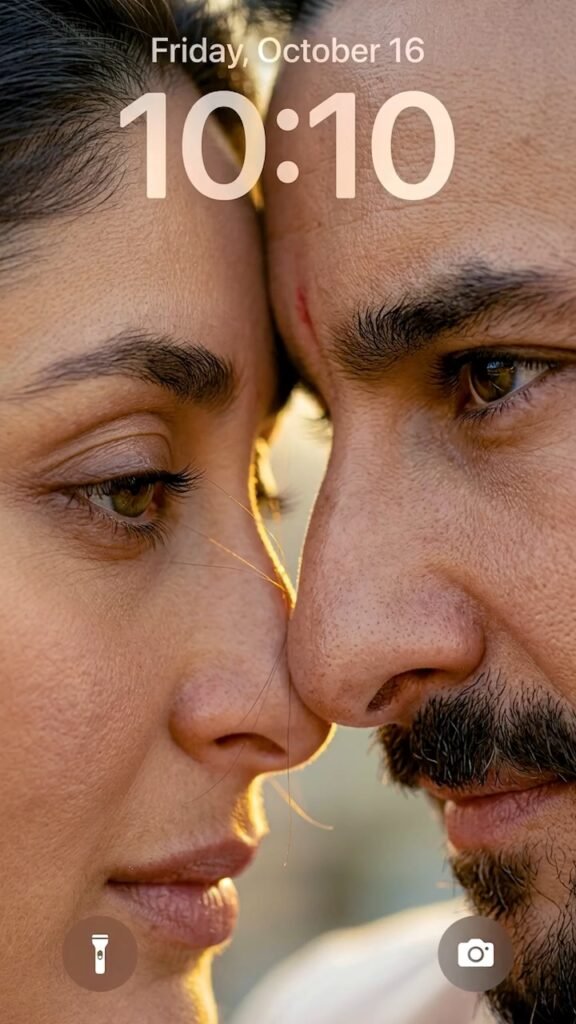
Generate a vertical 9:16 ultra-realistic 8K iPhone lock screen wallpaper featuring an intimate, extreme macro close-up of a romantic couple (see attached image) faces almost touching. Frame the shot so only one glossy hazel-brown eye of each person is visible: the man’s eye is fully open, while the woman’s eye is softly, partially closed. Capture hyper-detailed natural skin texture, visible pores, individual eyelashes, and loose hair strands drifting between them. Bathe the scene in warm golden hour cinematic lighting with soft eye reflections and a shallow depth-of-field blurred background. Overlay an authentic iOS lock screen UI: at the top, render a soft white translucent depth-effect blur displaying the time “11:11” and the date “Sunday, 11 2026” above it; at the bottom corners, place realistic iOS flashlight (left) and camera (right) icons.

Tips for Getting Better AI Wallpaper Results

Choose the right style: Decide whether you want an aesthetic, nature, dark, 3D, or futuristic wallpaper.

Describe the colours: Mention the exact colours you want in your background.

Use lighting details: Words such as cinematic lighting, soft glow, and realistic shadows can help describe the desired look.

Keep the design clean: Avoid adding too many objects if you want a simple wallpaper.

Choose the right ratio: Use a vertical layout for mobile screens and a horizontal layout for desktop screens.

Try different prompts: Small changes in your description can produce different creative results.

Conclusion

Trending Wallpaper AI Prompts make it easy to explore creative wallpaper designs without spending hours on manual editing. Whether you want a beautiful aesthetic background, a dark neon design, a realistic nature scene, or a colourful galaxy wallpaper, you can use these prompts to get started. Open ChatGPT, copy your favourite prompt, and experiment with different styles to create a wallpaper that matches your taste. Save your favourite result and give your phone or desktop a fresh new look!


Leave a Reply

Your email address will not be published. Required fields are marked *