Want to create realistic UGC ads using AI without recording yourself in front of a camera? With the right UGC Ads AI Video Prompt, you can create engaging product promotion videos that look natural and feel like real user-generated content. AI video tools have made it much easier to create product videos, social media ads, and promotional content. You can simply provide an image, product details, or a suitable reference and use an AI prompt to generate a realistic UGC-style video.
What is a UGC Ads AI Video Prompt?
A UGC Ads AI Video Prompt is a text instruction that tells an AI video generator how to create a user-generated content style advertisement.
The prompt can describe the person, product, location, camera movement, expressions, dialogue, lighting, and overall video style. A well-written prompt helps the AI understand exactly how you want the final video to look.
UGC-style videos are popular on platforms like Instagram Reels, YouTube Shorts, TikTok, and other social media platforms because they can feel more personal and relatable than traditional advertisements.
How to Create UGC Ads with AI
Creating an AI UGC advertisement is quite simple. First, choose the product or service that you want to promote. You can then prepare a product image or reference image if your AI video tool supports image-to-video generation.
Next, use a detailed UGC Ads AI Video Prompt. Mention how the person should present the product, what they should say, how the camera should move, and what kind of environment you want.
For example, you can create a prompt where a creator is holding a product, talking naturally to the camera, showing the product from different angles, and explaining its main benefits.
UGC Ads AI Video Prompt Example
You can use a prompt like this as a starting point:
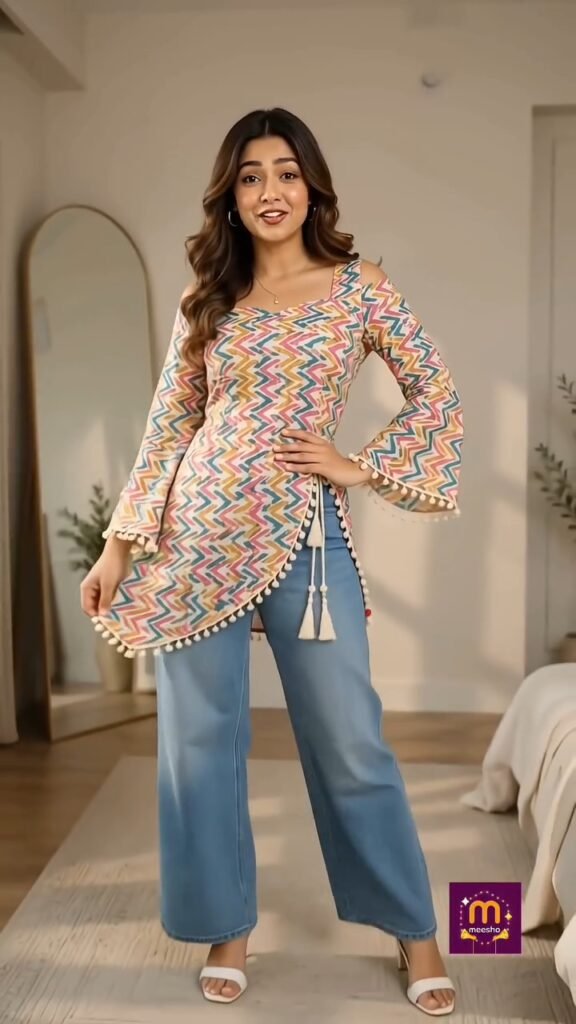
Create a highly realistic 10-second vertical 9:16 UGC fashion video featuring the same young Indian female from the provided girl reference image [Image2]. IMPORTANT REFERENCE RULES: – [Image2] = Girl/Face Reference: Use the exact same woman from Image2 throughout the entire video. Preserve her facial identity, face shape, eyes, nose, lips, skin tone, hairstyle, hair color, age, and natural facial features. Do not redesign, beautify, replace, or change her face. – [Image1] = Exact Dress/Product Reference: The dress shown in Image1 must be reproduced exactly when she holds it and when she wears it. – The dress must remain identical to Image1 in color, print, pattern, neckline, sleeves, fabric texture, length, fitting, stitching, and overall design. – Do not alter, redesign, recolor, simplify, or add any details to the dress. – The woman and dress must remain visually consistent across all shots. – No face morphing, identity change, extra fingers, distorted hands, duplicate body parts, or unnatural anatomy. STYLE: Authentic Indian fashion creator filming a casual Instagram Reel at home using a smartphone. Natural indoor lighting, realistic skin texture, handheld smartphone camera feel, slight natural camera movement, authentic expressions and body movement. The video should feel like a genuine UGC creator video, not a polished fashion advertisement. 00:00–00:03 — WHISPER HOOK Extreme close-up of the woman from [Image2]. She leans very close toward the smartphone camera and whispers directly to the viewer with an excited, secretive expression. Natural lip movement synchronized perfectly with the dialogue. Dialogue: "Shhh… ek secret bataun? Ye dress maine Meesho se mangayi hai." 00:03–00:05 — SHOW THE DRESS Cut naturally to a medium shot. The SAME woman from [Image2] quickly holds the exact dress from [Image1] in front of the camera and clearly shows its complete design. She looks excited and smiles naturally while displaying the dress. Make sure the dress remains visually identical to Image1. Dialogue: "Aur guys, iska look dekho!" 00:05–00:10 — WEARING THE DRESS Use a quick, natural UGC-style transition. The SAME woman from [Image2] is now wearing the EXACT SAME dress from [Image1]. Her face and identity must remain unchanged. She takes one small step backward, showing the outfit clearly from head to approximately knees. She naturally turns slightly to the left and right to show the dress from different angles, then looks directly into the camera and smiles. Dialogue: "Pehen ke toh aur bhi cute lag rahi hai, aur fitting bhi perfect hai!" FINAL QUALITY: Photorealistic Indian woman, authentic smartphone footage, realistic skin pores and texture, natural body proportions, natural fabric movement, accurate dress details, realistic lighting, believable hand movements, perfect facial consistency, accurate lip-sync, subtle handheld camera motion, no artificial beauty filter, no cinematic commercial look, no text or subtitles, no watermark.
Make Your AI UGC Videos Look More Realistic
The quality of your prompt can make a big difference. Instead of using a very short instruction, describe the important details of the scene.
You can mention things like:
•Natural facial expressions
•Realistic hand movements
•Casual creator-style presentation
•Product close-up shots
•Natural camera movement
•Realistic lighting
•Clean background
•Consistent character appearance
•Clear product visibility
•Short and engaging dialogue
These details can help create a more natural-looking UGC advertisement.
Why Use AI for UGC Ads?
Creating traditional UGC ads can require a creator, camera setup, lighting, editing, and multiple takes. AI can reduce much of this work and help you create different versions of an advertisement more quickly.
You can also experiment with different creators, locations, scripts, and presentation styles without recording every version manually.
This makes AI-generated UGC videos useful for testing different creative ideas for social media campaigns.
Where Can You Use AI UGC Videos?
AI-generated UGC-style videos can be used for different types of content, including:
•Instagram Reels
•YouTube Shorts
•TikTok videos
•Product advertisements
•E-commerce promotions
•App promotions
•Social media marketing
•Product demonstrations
•Brand awareness videos
However, always follow the advertising rules of the platform and clearly disclose AI-generated or sponsored content when required.
Final Words
The UGC Ads AI Video Prompt can help you create realistic and engaging product promotion videos with AI. The key is to give the AI clear instructions about the creator, product, environment, camera movement, expressions, and overall style.
You can start with the prompt above and customize it for your own product or campaign. With a good reference image and a detailed prompt, you can create professional-looking UGC-style videos without a traditional camera setup.
