The Fan Outfit Change Transition is a trending video editing idea that can make your fashion and transition videos look more attractive. In this effect, the outfit changes smoothly with a fan or hand movement, creating a stylish transformation that is perfect for Instagram Reels, YouTube Shorts, and TikTok-style videos. You can create this type of transition with the help of AI video tools or simple video editing apps. The main idea is to record or generate two clips with different outfits and use a smooth movement to connect both scenes.
How to Create a Fan Outfit Change Transition
To create this trending outfit transition, first prepare two images or video clips. The first clip should show your original outfit, while the second clip should show the new outfit you want to wear.
You can use an AI video generator to create a smooth transition between these two looks. Add a suitable prompt describing the outfit change, camera movement, fan movement, and realistic body motion.
For a better result, keep the camera angle, background, lighting, and character appearance consistent in both clips. This helps the transition look more natural and realistic.
Fan Outfit Change Transition Prompt
You can use a detailed AI prompt to generate the transition. Describe the person, outfit, camera angle, movement, lighting, and the exact moment when the outfit changes.
The fan or hand movement can be used as the transition point. When the fan moves in front of the camera, the outfit can change during the movement, creating a smooth and impressive transformation effect.
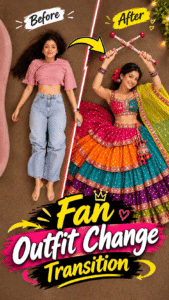
Create a photorealistic 15-second vertical 9:16 fashion video featuring ONE CHARACTER wearing five outfits, using my five uploaded images in their upload order. IDENTITY AND OUTFITS: All five images show the same person. Preserve their face, skin tone, body shape and hairstyle consistently throughout. Image 1 supplies Outfit 1, Image 2 supplies Outfit 2, continuing through Outfit 5. Reproduce the garments, colours, fabrics, footwear and visible accessories accurately. Use these images as identity and wardrobe references; recreate the setting and actions described below. CAMERA AND COMPOSITION: One continuous-looking shot from a completely stationary camera pointing vertically downward at exactly 90 degrees. The camera looks past a ceiling fan toward the person lying on the floor below. No zoom, pan, tilt, orbit or angle changes. A muted blue carpet fills the floor. A curved blush-pink sofa is partially cropped along the left edge. The person settles on the carpet beside it, head toward the top of the frame and feet toward the bottom. Keep their complete body comfortably inside the frame after the opening roll. CHROME FAN: A large polished CHROME ceiling fan occupies the extreme foreground, suspended between the camera and the person. Its reflective circular motor housing is partially cropped at the top centre. Broad metallic blades pass very close to the lens and appear large enough to sweep across their body. Preserve realistic silver reflections, blade brackets and rounded blade ends. The fan begins stationary, then rotates clockwise after the person presses a remote. Its blades remain visually readable, with restrained natural motion blur. The rotating blade itself creates each outfit transition. TIMING AND ACTION: 0.0–1.5 seconds: Wearing Outfit 1. At the start, the person lies fully on top of the pink sofa, their entire body supported by its cushions, then rolls sideways off the edge toward screen-right and naturally drops onto the carpet, landing on their back with head toward the top of the frame and feet toward the bottom. 1.5–2.3 seconds: They look upward toward the camera, relax their shoulders and straighten their legs, with elbows bent beside them. 2.3–4.4 seconds: They reach for a small silver remote on the carpet at screen-right, lift it toward the ceiling fan and press its button once. 4.4–5.5 seconds: They lower their hand as the fan starts rotating clockwise. A broad chrome blade sweeps down across their body, concealing the first outfit change. 5.5–8.2 seconds: Reveal Outfit 2. They remain in the same position on the carpet, placing both hands near their waist, elbows outward, ankles lightly crossed, with a subtle head turn. 8.2–10.9 seconds: The next blade sweep reveals Outfit 3. One hand rests on their hip, the other on the carpet, with knees angled slightly to one side. 10.9–13.3 seconds: Another blade sweep reveals Outfit 4. They fold their arms across their chest and lightly cross their ankles, looking confidently upward. 13.3–15.0 seconds: The final blade sweep reveals Outfit 5. One hand rests on their stomach, the other extends gently outward. They turn their face slightly toward the sofa with a relaxed expression. End with the final outfit clearly visible. TRANSITION RULES: Exactly five outfits and four outfit changes. Each change must be concealed by the passing chrome blade: the previous outfit remains ahead of the blade, and the new outfit appears behind its trailing edge. Conceal pose changes within the same sweep. No visible clothing morphing, dissolves, flashes or exposed jump cuts. Keep the room, camera, body scale and floor position continuous. Natural movement, realistic anatomy, believable fabric motion, soft warm editorial lighting and consistent shadows. No duplicated people, extra limbs, face changes, floating body parts or additional scene cuts. WATERMARK: Add a small, subtle, clean text watermark reading “Vi Editor” in the bottom-left corner of the entire video. Keep the watermark small, elegant, semi-transparent and unobtrusive. The watermark must remain fixed in the bottom-left corner throughout the entire video. Do not place the watermark over the person's face or important visual details. Do not animate, distort, duplicate or change the watermark.
Make Your Video More Realistic
For a realistic result, make sure the face, hairstyle, skin tone, body shape, and background remain consistent throughout the video. Avoid unnecessary camera movements or sudden changes.
You can also add trending music, slow-motion effects, or sound effects after generating the video to make the final Reel more engaging.
Final Words
The Fan Outfit Change Transition is a simple and creative way to make stylish fashion transformation videos. With the right AI prompt and a consistent reference image, you can create a smooth outfit-change effect without complicated editing.
Try this trend with different outfits, locations, and camera movements to create unique videos for Instagram Reels, YouTube Shorts, and other social media platforms.
