Hello friends, in today’s article we are going to share everything about IPL Broadcast AI Video Editing Prompt 2026 absolutely free. Using these AI prompts, you can create amazing IPL broadcast-style cinematic videos and photos with your own picture in just one click. These edits are becoming very viral on Instagram Reels, Facebook, and YouTube Shorts because they look exactly like live cricket broadcast visuals.
In this article, we will explain what IPL Broadcast AI Video Editing is, why this trend is going viral, how you can create these edits using AI tools like Google Gemini, and we will also provide ready-to-use AI prompts that you can copy and paste directly. So read this article till the end carefully.
What Is IPL Broadcast AI Video Editing Prompt?
IPL Broadcast AI Video Editing is a trending AI editing style where your normal photo or video is transformed into a professional cricket broadcast scene. The AI adds effects like:
•Stadium background
•Live match atmosphere
•Cinematic camera movement
•Scoreboard overlays
•Spotlight and crowd effects
•Slow-motion player entry
•TV broadcast graphics
The final result looks like you are playing in a real IPL match being shown live on television.
With AI tools, you don’t need advanced editing skills or expensive software. Just upload your photo, paste the AI prompt, and the tool creates a realistic IPL broadcast-style video automatically.
Why Is IPL Broadcast AI Video Editing Going Viral?
There are many reasons why IPL Broadcast AI edits are trending everywhere on social media:
•Cricket content always gets high engagement in India
•IPL broadcast effects look premium and cinematic
•AI creates realistic stadium visuals in seconds
•Perfect for Instagram Reels and YouTube Shorts
•Easy to make without professional editing skills
•People love personalized cricket player edits
When creators upload these videos, viewers immediately ask for the AI prompt, which helps the trend grow even faster.
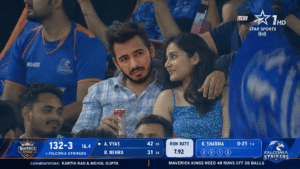
Image Prompt: GPT Image 2 or Nano Banana
Create a photorealistic 16:9 live Indian cricket broadcast screenshot of a young couple captured from far away by a stadium zoom camera during an IPL-style night match.
Use the provided face reference image for the man and keep his facial features highly accurate: same face shape, eyes, nose, lips, beard/stubble pattern, skin tone, hairstyle volume, and natural expression. Do not beautify or change his identity. He should look like the same person from the reference, only seated in a cricket stadium.
Use the provided woman reference for the woman, but make her realistic and human, not doll-like. Keep her attractive but grounded with natural skin texture, realistic eyes, subtle imperfections, believable facial proportions, and soft candid expression.
Scene:
The couple is sitting among a dense crowd inside a packed Indian cricket stadium during a night match. They are not posing for the camera. They look like they were unexpectedly picked up by the long-range broadcast camera installed in the stadium. The camera is far away and zoomed in, like real IPL audience reaction shots.
Important camera style:
This should NOT look like a camera is directly in front of them.
This should NOT look like a close DSLR portrait or staged photoshoot.
Make it look like a telephoto broadcast zoom shot from across the stadium.
Use long-lens compression, slightly flattened perspective, medium-wide crowd framing, mild atmospheric haze, subtle broadcast softness, minor motion blur, slight digital zoom artifacts, realistic compression noise, and live TV sharpness.
The couple should be visible clearly, but not overly crisp or perfectly lit.
Composition:
Frame them from the audience section, with other spectators partially blocking the foreground and background. Some heads, shoulders, flags, and jerseys should naturally overlap the frame, making it feel like the broadcast camera is peeking through the crowd. The couple should be seated in the middle rows, not isolated. Keep surrounding fans close to them so they feel integrated in the stadium crowd.
Pose and emotion:
The man has his arm naturally around the woman’s shoulder and holds a red-and-silver soda can in his other hand. He wears a light blue casual shirt or a light checkered shirt, matching the cool blue stadium vibe. The woman wears a blue summer dress. They are looking at each other with shy, warm, candid chemistry, as if they just realized they are on the big screen. Their expressions should be natural, slightly surprised, and sweet, not posed.
Lighting:
Use only ambient stadium lighting and weak spill light from the cricket field. No cinematic spotlight. No dramatic key light. No beauty lighting. The couple should blend into the crowd brightness naturally, like a real live match broadcast. Skin tones should have natural stadium-light shadows and slight unevenness.
Background:
Packed Indian cricket stadium, night match atmosphere, fans in blue jerseys, waving flags, LED ribbon boards, stadium seating, blurred crowd movement, lively but realistic environment. The crowd should feel dense and natural, not generated or empty.
Broadcast overlay:
Add a Star Sports-style Indian cricket broadcast presentation:
– channel watermark in the top corner, inspired by Indian sports TV
– LIVE tag
– modern cricket scoreboard lower-third
– fictional team names only
– fictional score, overs, wickets
– run rate or required run rate
– batsman and bowler stats
– small commentary ticker
– clean layered TV graphics
Do not use real IPL team names, real player names, real sponsors, or real match details. Use fictional teams and fictional players.
Quality:
Ultra-photorealistic, authentic live sports telecast look, realistic human skin texture, natural fabric details, believable stadium zoom-camera perspective, subtle compression artifacts, slightly imperfect broadcast capture, candid audience reaction moment.
Negative prompt:
Do not make it look like a professional portrait photoshoot.
Do not make the couple look directly into the camera.
Do not use cinematic lighting.
Do not isolate them from the crowd.
Do not make the faces overly smooth or doll-like.
Do not make the man’s face generic.
Do not change the man’s identity from the reference image.
Do not create fake plastic skin.
Do not use real IPL team names or real player names.
Do not make the scoreboard unreadable or messy.
Do not make it look like a front-facing mobile photo.
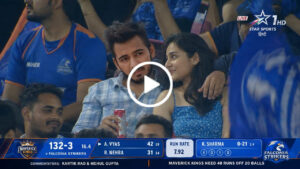
Kling or Seedance Prompt:
Create a realistic 15-second live Indian cricket broadcast crowd cutaway during a fictional IPL-style night match in a packed stadium.
This should feel like a genuine long-lens zoom-camera shot captured by the audience camera installed in IPL matches, not a front-facing camera, not a close portrait shoot, and not a staged couple video.
The couple must match the last image closely:
– The boyfriend must preserve the same identity, facial structure, hairstyle, stubble/beard pattern, skin tone, and expression as in the last image.
– He is wearing the same light grey-blue small check shirt.
– He has one arm naturally around the girl’s shoulder.
– He is holding a silver-and-red soda can in his other hand at the beginning.
– The girl should match the same appearance and outfit as the last image.
– She is wearing the same blue floral summer dress.
– Both remain seated the entire time.
Setting:
A packed Indian cricket stadium during a night match with a strong IPL-style atmosphere. Dense crowd, blue jerseys, stadium seating, LED ribbon boards, ambient stadium lighting, and natural crowd movement. The couple should feel embedded in the audience, surrounded by nearby spectators. Include partial heads and shoulders of other people in the foreground and background so the framing feels like a real broadcast zoom shot through the crowd.
Camera style:
Single continuous take. No cuts. No angle changes.
Use a telephoto broadcast lens feel, like a zoom camera positioned far away in the stadium.
The shot should feel like the camera operator spotted the couple in the crowd and gently held on them.
Use long-lens compression, slight broadcast softness, subtle live-TV grain, mild compression artifacts, realistic stadium lighting, and authentic sports-broadcast framing.
Do NOT make it feel like the couple are directly facing a camera placed in front of them.
Do NOT make it look like a cinematic scene or influencer-style couple shoot.
Action timing:
0–4s:
The zoom camera lands on the couple naturally in the crowd.
The boyfriend stays mostly focused on the big stadium screen, casually smiling and reacting to the cricket match instead of reacting to the camera.
The girl realizes they are being shown on the broadcast and smiles shyly while avoiding direct eye contact with the camera.
Both should feel natural and slightly surprised, not posed.
4–7s:
Without looking directly at the camera, the boyfriend casually lifts the silver-and-red soda can a little in a playful celebratory gesture, while still mostly watching the stadium screen.
The crowd around them reacts naturally.
The girl gets shy and briefly hides part of her face with her hands while smiling.
7–11s:
The boyfriend lowers or places the soda can down naturally and forms one half of a heart gesture with his fingers toward the girl.
She shyly completes the other half, forming a full heart together.
Keep the gesture subtle, soft, and believable, like a spontaneous crowd-camera moment.
Nearby spectators react with soft cheering and laughter.
11–13s:
The girl quickly leans in and gives him a soft peck on the cheek.
The boyfriend reacts with a proud grin and a small laugh, but still feels more focused on the match atmosphere than on the camera.
Audience reaction grows slightly louder for a moment.
13–15s:
Both become embarrassed and smile softly.
The girl hides her smile a little and looks away shyly.
The boyfriend naturally returns his full attention toward the cricket match and the stadium screen.
They remain seated and relaxed.
On-screen graphics:
Add a static Indian cricket broadcast scorebug at the bottom for the full 15 seconds.
No animation, no score updates, no switching graphics.
Use fictional IPL-style broadcast graphics inspired by Indian sports telecasts.
Include:
– fictional team names
– score
– wickets
– overs
– run rate / required run rate
– batsman and bowler stats
– small live-broadcast styling
Also include a top-corner sports-channel style watermark and LIVE tag, inspired by Indian cricket telecasts, but use fictional branding and fictional match details.
Audio:
Natural stadium ambience throughout.
Distant cheering, crowd murmur, occasional soft laughter during the heart gesture and cheek kiss.
Include realistic commentary from two male cricket commentators reacting casually to the couple appearing on screen.
No audible dialogue from the couple.
No whispering, no direct speech, no exaggerated laughing from them.
Important constraints:
– Preserve identity strongly, especially the boyfriend’s face from the last image
– Match wardrobe from the last image
– Keep both seated the entire time
– No direct talking to camera
– No constant eye contact with camera
– No exaggerated gestures
– No scene cuts
– No angle changes
– No scorebug changes
– Must feel like a genuine IPL live-broadcast crowd moment
– Must feel like the couple are captured by a far-away stadium zoom camera, not filmed from nearby
How To Create IPL Broadcast AI Video Editing
You can easily create your own IPL Broadcast AI Video by following these simple steps:
- Open Google Gemini or any AI video editing tool
- Login with your Google account
- Upload your clear front-facing photo
- Copy any IPL Broadcast AI Prompt
- Paste the prompt with your image
- Click on Generate
- Wait for 10 to 20 seconds
- Download your cinematic AI video
That’s it. Your viral IPL Broadcast AI Edit is ready.
Tips For Best IPL Broadcast AI Results
To make your AI edits look more realistic and professional, follow these tips:
•Use a high-quality clear photo
•Upload front-facing images for better face results
•Use cinematic and realistic keywords in prompts
•Try stadium backgrounds with night lighting
•Add slow-motion and broadcast effects keywords
•Adjust brightness and contrast after generating
These small improvements can make your AI video look much more viral and professional.
Best AI Tools For IPL Broadcast Editing
You can use these AI tools to create IPL Broadcast AI Videos:
•Google Gemini
•ChatGPT AI Image Tools
•Kling AI
•PixVerse AI
•Runway ML
•Pika Labs
Most of these tools work with simple prompts and generate results within seconds.
Conclusion
We hope this article helped you understand IPL Broadcast AI Video Editing Prompt 2026 easily. This trend is growing very fast on Instagram and YouTube Shorts because the edits look exactly like professional cricket broadcast scenes.
By using the prompts and methods shared above, you can create stunning IPL cinematic videos in just one click without any editing experience.
If you want more trending AI video editing prompts, you can visit our YouTube channel “TECHNICAL SUJIT” for step-by-step tutorials and latest viral AI editing trends.

IPL Broadcast Ai Video Editing Prompt
sujitkumar620082@gmail.com May 12, 2026 Leave a Commenton IPL Broadcast Ai Video Editing Prompt Posted inAi Prompt
Hello friends, in today’s article we are going to share everything about IPL Broadcast AI Video Editing Prompt 2026 absolutely free. Using these AI prompts, you can create amazing IPL broadcast-style cinematic videos and photos with your own picture in just one click. These edits are becoming very viral on Instagram Reels, Facebook, and YouTube Shorts because they look exactly like live cricket broadcast visuals.
In this article, we will explain what IPL Broadcast AI Video Editing is, why this trend is going viral, how you can create these edits using AI tools like Google Gemini, and we will also provide ready-to-use AI prompts that you can copy and paste directly. So read this article till the end carefully.
Broadcast ai video editing
What Is IPL Broadcast AI Video Editing Prompt?
IPL Broadcast AI Video Editing is a trending AI editing style where your normal photo or video is transformed into a professional cricket broadcast scene. The AI adds effects like:
•Stadium background
•Live match atmosphere
•Cinematic camera movement
•Scoreboard overlays
•Spotlight and crowd effects
•Slow-motion player entry
•TV broadcast graphics
The final result looks like you are playing in a real IPL match being shown live on television.
With AI tools, you don’t need advanced editing skills or expensive software. Just upload your photo, paste the AI prompt, and the tool creates a realistic IPL broadcast-style video automatically.
Why Is IPL Broadcast AI Video Editing Going Viral?
There are many reasons why IPL Broadcast AI edits are trending everywhere on social media:
•Cricket content always gets high engagement in India
•IPL broadcast effects look premium and cinematic
•AI creates realistic stadium visuals in seconds
•Perfect for Instagram Reels and YouTube Shorts
•Easy to make without professional editing skills
•People love personalized cricket player edits
When creators upload these videos, viewers immediately ask for the AI prompt, which helps the trend grow even faster.
IPL Broadcast AI Video Editing Prompt
IPL Broadcast AI Video Editing Prompt
Image Prompt: GPT Image 2 or Nano Banana
Create a photorealistic 16:9 live Indian cricket broadcast screenshot of a young couple captured from far away by a stadium zoom camera during an IPL-style night match.
Use the provided face reference image for the man and keep his facial features highly accurate: same face shape, eyes, nose, lips, beard/stubble pattern, skin tone, hairstyle volume, and natural expression. Do not beautify or change his identity. He should look like the same person from the reference, only seated in a cricket stadium.
Use the provided woman reference for the woman, but make her realistic and human, not doll-like. Keep her attractive but grounded with natural skin texture, realistic eyes, subtle imperfections, believable facial proportions, and soft candid expression.
Scene:
The couple is sitting among a dense crowd inside a packed Indian cricket stadium during a night match. They are not posing for the camera. They look like they were unexpectedly picked up by the long-range broadcast camera installed in the stadium. The camera is far away and zoomed in, like real IPL audience reaction shots.
Important camera style:
This should NOT look like a camera is directly in front of them.
This should NOT look like a close DSLR portrait or staged photoshoot.
Make it look like a telephoto broadcast zoom shot from across the stadium.
Use long-lens compression, slightly flattened perspective, medium-wide crowd framing, mild atmospheric haze, subtle broadcast softness, minor motion blur, slight digital zoom artifacts, realistic compression noise, and live TV sharpness.
The couple should be visible clearly, but not overly crisp or perfectly lit.
Composition:
Frame them from the audience section, with other spectators partially blocking the foreground and background. Some heads, shoulders, flags, and jerseys should naturally overlap the frame, making it feel like the broadcast camera is peeking through the crowd. The couple should be seated in the middle rows, not isolated. Keep surrounding fans close to them so they feel integrated in the stadium crowd.
Pose and emotion:
The man has his arm naturally around the woman’s shoulder and holds a red-and-silver soda can in his other hand. He wears a light blue casual shirt or a light checkered shirt, matching the cool blue stadium vibe. The woman wears a blue summer dress. They are looking at each other with shy, warm, candid chemistry, as if they just realized they are on the big screen. Their expressions should be natural, slightly surprised, and sweet, not posed.
Lighting:
Use only ambient stadium lighting and weak spill light from the cricket field. No cinematic spotlight. No dramatic key light. No beauty lighting. The couple should blend into the crowd brightness naturally, like a real live match broadcast. Skin tones should have natural stadium-light shadows and slight unevenness.
Background:
Packed Indian cricket stadium, night match atmosphere, fans in blue jerseys, waving flags, LED ribbon boards, stadium seating, blurred crowd movement, lively but realistic environment. The crowd should feel dense and natural, not generated or empty.
Broadcast overlay:
Add a Star Sports-style Indian cricket broadcast presentation:
– channel watermark in the top corner, inspired by Indian sports TV
– LIVE tag
– modern cricket scoreboard lower-third
– fictional team names only
– fictional score, overs, wickets
– run rate or required run rate
– batsman and bowler stats
– small commentary ticker
– clean layered TV graphics
Do not use real IPL team names, real player names, real sponsors, or real match details. Use fictional teams and fictional players.
Quality:
Ultra-photorealistic, authentic live sports telecast look, realistic human skin texture, natural fabric details, believable stadium zoom-camera perspective, subtle compression artifacts, slightly imperfect broadcast capture, candid audience reaction moment.
Negative prompt:
Do not make it look like a professional portrait photoshoot.
Do not make the couple look directly into the camera.
Do not use cinematic lighting.
Do not isolate them from the crowd.
Do not make the faces overly smooth or doll-like.
Do not make the man’s face generic.
Do not change the man’s identity from the reference image.
Do not create fake plastic skin.
Do not use real IPL team names or real player names.
Do not make the scoreboard unreadable or messy.
Do not make it look like a front-facing mobile photo.
IPL AI Video Editing Prompt 2026
IPL AI Video Editing Prompt 2026
Kling or Seedance Prompt:
Create a realistic 15-second live Indian cricket broadcast crowd cutaway during a fictional IPL-style night match in a packed stadium.
This should feel like a genuine long-lens zoom-camera shot captured by the audience camera installed in IPL matches, not a front-facing camera, not a close portrait shoot, and not a staged couple video.
The couple must match the last image closely:
– The boyfriend must preserve the same identity, facial structure, hairstyle, stubble/beard pattern, skin tone, and expression as in the last image.
– He is wearing the same light grey-blue small check shirt.
– He has one arm naturally around the girl’s shoulder.
– He is holding a silver-and-red soda can in his other hand at the beginning.
– The girl should match the same appearance and outfit as the last image.
– She is wearing the same blue floral summer dress.
– Both remain seated the entire time.
Setting:
A packed Indian cricket stadium during a night match with a strong IPL-style atmosphere. Dense crowd, blue jerseys, stadium seating, LED ribbon boards, ambient stadium lighting, and natural crowd movement. The couple should feel embedded in the audience, surrounded by nearby spectators. Include partial heads and shoulders of other people in the foreground and background so the framing feels like a real broadcast zoom shot through the crowd.
Camera style:
Single continuous take. No cuts. No angle changes.
Use a telephoto broadcast lens feel, like a zoom camera positioned far away in the stadium.
The shot should feel like the camera operator spotted the couple in the crowd and gently held on them.
Use long-lens compression, slight broadcast softness, subtle live-TV grain, mild compression artifacts, realistic stadium lighting, and authentic sports-broadcast framing.
Do NOT make it feel like the couple are directly facing a camera placed in front of them.
Do NOT make it look like a cinematic scene or influencer-style couple shoot.
Action timing:
0–4s:
The zoom camera lands on the couple naturally in the crowd.
The boyfriend stays mostly focused on the big stadium screen, casually smiling and reacting to the cricket match instead of reacting to the camera.
The girl realizes they are being shown on the broadcast and smiles shyly while avoiding direct eye contact with the camera.
Both should feel natural and slightly surprised, not posed.
4–7s:
Without looking directly at the camera, the boyfriend casually lifts the silver-and-red soda can a little in a playful celebratory gesture, while still mostly watching the stadium screen.
The crowd around them reacts naturally.
The girl gets shy and briefly hides part of her face with her hands while smiling.
7–11s:
The boyfriend lowers or places the soda can down naturally and forms one half of a heart gesture with his fingers toward the girl.
She shyly completes the other half, forming a full heart together.
Keep the gesture subtle, soft, and believable, like a spontaneous crowd-camera moment.
Nearby spectators react with soft cheering and laughter.
11–13s:
The girl quickly leans in and gives him a soft peck on the cheek.
The boyfriend reacts with a proud grin and a small laugh, but still feels more focused on the match atmosphere than on the camera.
Audience reaction grows slightly louder for a moment.
13–15s:
Both become embarrassed and smile softly.
The girl hides her smile a little and looks away shyly.
The boyfriend naturally returns his full attention toward the cricket match and the stadium screen.
They remain seated and relaxed.
On-screen graphics:
Add a static Indian cricket broadcast scorebug at the bottom for the full 15 seconds.
No animation, no score updates, no switching graphics.
Use fictional IPL-style broadcast graphics inspired by Indian sports telecasts.
Include:
– fictional team names
– score
– wickets
– overs
– run rate / required run rate
– batsman and bowler stats
– small live-broadcast styling
Also include a top-corner sports-channel style watermark and LIVE tag, inspired by Indian cricket telecasts, but use fictional branding and fictional match details.
Audio:
Natural stadium ambience throughout.
Distant cheering, crowd murmur, occasional soft laughter during the heart gesture and cheek kiss.
Include realistic commentary from two male cricket commentators reacting casually to the couple appearing on screen.
No audible dialogue from the couple.
No whispering, no direct speech, no exaggerated laughing from them.
Important constraints:
– Preserve identity strongly, especially the boyfriend’s face from the last image
– Match wardrobe from the last image
– Keep both seated the entire time
– No direct talking to camera
– No constant eye contact with camera
– No exaggerated gestures
– No scene cuts
– No angle changes
– No scorebug changes
– Must feel like a genuine IPL live-broadcast crowd moment
– Must feel like the couple are captured by a far-away stadium zoom camera, not filmed from nearby