Hello friends, in today’s article we are going to share everything about IPL Ai Video Editing Prompt absolutely free. With the help of these AI prompts, you can create cinematic IPL-style AI videos using your own photo or clips in just one click. These types of edits are currently trending on Instagram Reels, YouTube Shorts, and Facebook because they look premium, energetic, and highly realistic.
In this article, you will learn what IPL Ai Video Editing is, why this trend is going viral, how you can create these videos using AI tools like Google Gemini, ChatGPT, Kling AI, PixVerse, and CapCut, and we will also provide ready-to-use prompts that you can copy and paste directly. So read this article till the end carefully.
What Is IPL Ai Video Editing Prompt?
IPL Ai Video Editing Prompt is a trending AI editing style where your photo or video is transformed into a cinematic cricket broadcast scene using artificial intelligence. The final output looks like an official IPL promo or sports advertisement with dramatic camera movements, stadium lights, crowd effects, slow motion shots, and realistic player animations.
Using AI tools, you do not need professional editing skills or expensive software. You simply upload your photo, paste a prompt, and AI automatically generates a stunning IPL-style video within seconds.
Why Is IPL Ai Video Editing Trending?
There are many reasons why IPL Ai Video Editing videos are becoming viral on social media platforms:
• Cricket content always gets massive engagement in India
• Cinematic IPL effects look professional and eye-catching
• AI tools can generate realistic videos very quickly
• Perfect content for Instagram Reels and YouTube Shorts
• Easy to create without advanced editing knowledge
• Sports and broadcast style videos increase watch time
When creators upload these AI IPL edits, people become curious and ask for prompts, which helps the videos gain even more reach and engagement.
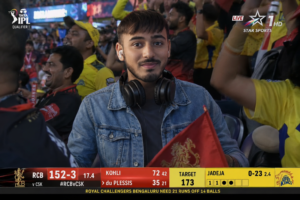
IMAGE PROMPT- A screenshot from a live IPL cricket TV broadcast on Star Sports. The camera cuts to the audience -our reference image person sitting in the crowd, smiling naturally and unaware they’re on camera. The subject is seated in premium stadium seats near the boundary rope during a high-energy match between Royal Challengers Bengaluru (RCB) and Chennai Super Kings (CSK). Hardlock: Do not alter their facial structure, skin texture, or likeness in any way.
The stadium atmosphere is electric packed crowd, vibrant red and yellow team colors throughout the stands, dramatic stadium floodlights, flags waving, blurred motion from cheering fans in the background. Full authentic cricket broadcast overlay visible: IPL-style scorecard graphics, Star Sports logo watermark, over count, team scores, player stats ticker, match status. The game is IPL playoffs -Qualifier match atmosphere. RCB currently leading the series momentum after dominating previous matches against CSK.
The image should look exactly
VIDEO PROMPT- Natural face animation, soft smile, blinking eyes, looking left and right, slight head movement, realistic breathing, cinematic lighting, smooth motion, realistic human expression, stable camera.
Best AI Tools for IPL Ai Video Editing
Here are some popular AI tools that you can use to create IPL AI videos:
• Google Gemini
• ChatGPT
• Kling AI
• PixVerse AI
• Runway ML
• CapCut
• Canva AI
• Pika AI
These tools help you generate realistic animations, cinematic effects, and smooth transitions easily.
How To Create IPL Ai Video Editing
Follow these simple steps to create your own IPL AI video:
- Open Google Gemini or any AI video editing tool
- Login with your Google account
- Upload your clear photo or short video clip
- Copy any IPL AI prompt given below
- Paste the prompt with your uploaded image
- Click on Generate
- Wait for 10 to 30 seconds
- Download the final AI video
That’s it. Your viral IPL AI video is now ready to upload on social media.
Tips For Better AI Video Results
To get more realistic IPL AI videos, follow these tips:
• Use a high-quality clear photo
• Upload front-facing images for better face results
• Keep prompts simple and specific
• Add words like cinematic, ultra realistic, 4K, dramatic
• Use stadium or sports backgrounds
• Add slow motion and broadcast style effects
• Edit final video in CapCut for extra smoothness
These small improvements can make your AI video look much more professional and viral-ready.
Best Platform To Upload IPL AI Videos
You can upload your IPL AI edits on:
• Instagram Reels
• YouTube Shorts
• Facebook Reels
• Moj
• Josh
• TikTok (available countries)
Short-form video platforms are currently pushing AI content heavily, which can help your videos gain views quickly.
Conclusion
We hope this article helped you understand IPL Ai Video Editing Prompt easily. IPL AI edits are becoming one of the biggest viral trends on social media, and now you can also create these cinematic videos for free using AI tools.
By following the steps and prompts shared above, you can generate professional IPL-style AI videos in just one click without any editing skills. If you want more trending AI prompts and tutorials, you can also check our YouTube channel Technical Sujit for step-by-step videos.

mere ko ak rcb ka jarsi pahna do