Hello friends, in today’s article we are going to share everything about Broadcast Trend AI Video Tutorial absolutely free. Using these AI prompts and editing methods, you can create stunning cinematic broadcast-style AI videos with your own photos and clips in just one click. These videos are currently trending on Instagram Reels, Facebook, and YouTube Shorts because they look professional, viral, and highly engaging.
In this article, we will explain what Broadcast Trend AI Video is, why it is going viral, how you can create it using AI tools like Google Gemini, and we will also provide ready-to-use AI prompts that you can simply copy and paste. Make sure you read this article till the end without skipping.
What Is Broadcast Trend AI Video?
Broadcast Trend AI Video is a new trending AI editing style where your photo or video is transformed into a cinematic news broadcast, sports intro, dramatic TV-style presentation, or viral social media reel using artificial intelligence.
These videos usually include:
•Cinematic camera movement
•News-style broadcast effects
•Dramatic lighting and transitions
•Slow-motion scenes
•AI voiceover or captions
•Realistic background animations
The final result looks like a professional TV broadcast or movie trailer scene.
With AI tools, you don’t need advanced editing skills or expensive software. You simply upload your image or clip, paste a prompt, and AI automatically creates an amazing viral-style video for you.
Why Is Broadcast Trend AI Video Going Viral?
There are many reasons why Broadcast Trend AI Videos are becoming extremely popular on social media:
•Professional cinematic look attracts more viewers
•Broadcast-style effects feel unique and premium
•Perfect for Instagram Reels and YouTube Shorts
•AI creates videos within seconds
•No DSLR camera or studio setup needed
•Trending editing style increases engagement
When creators upload these videos, viewers often ask for the prompt and tutorial, which helps the trend spread even faster.
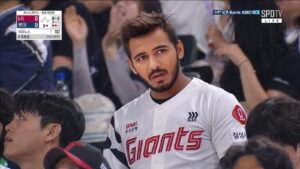
PROMPT- Realistic sports broadcast screenshot-style documentary photo taken in the spectator stands of a Korean professional baseball game. The person from the attached image is sitting naturally in the stadium seats, looking toward the field with a surprised yet focused expression. Keep the face 100% identical to the original image — same eyes, nose, lips, jawline, hairstyle, skin texture, and facial proportions. No face alteration, no beauty filter, no AI look.
The person is wearing a clean realistic white KBO Lotte Giants jersey with authentic sports fabric texture and subtle team details. Natural Korean stadium atmosphere, crowded audience in background, cinematic sports lighting, candid broadcast moment, slight motion blur, realistic skin pores, zoom lens feeling, live TV camera capture style, ultra realistic documentary photography. Soft glowing skin but fully natural. 16:9 horizontal sports broadcast composition
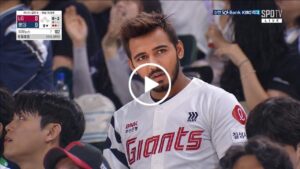
VIDEO PROMPT- Natural face animation, soft smile, blinking eyes, looking left and right, slight head movement, realistic breathing, cinematic lighting, smooth motion, realistic human expression, stable camera.
How To Create Broadcast Trend AI Video
You can easily create Broadcast Trend AI Videos by following these simple steps:
- Open Google Gemini or any AI video editing tool
- Sign in with your Google account
- Upload your clear photo or short video clip
- Copy any AI prompt
- Paste the prompt with your uploaded media
- Click on Generate
- Wait for 10 to 20 seconds
- Download your AI-generated video
That’s it. Your viral Broadcast Trend AI Video is ready.
Tips For More Realistic AI Videos
To get the best results, keep these tips in mind:
•Use high-quality photos or clips
•Choose cinematic or dark backgrounds
•Add words like ultra realistic, cinematic, broadcast style
•Keep prompts short and clear
•Use HD export settings
•Add slow-motion and dramatic music after editing
These small improvements can make your video look much more professional and viral-ready.
Conclusion
We hope this article helped you understand Broadcast Trend AI Video Tutorial easily. This new AI editing trend is growing very fast and is perfect for creating viral social media content. By using the prompts and methods shared above, you can create eye-catching cinematic videos without any editing skills.
If you face any issues or want more AI video editing prompts, you can comment below. We will try our best to help you. You can also check out our YouTube channel “TECHNICAL SUJIT” for step-by-step AI editing tutorials and trending prompts.

2 thoughts on “Broadcast Trend Ai Video Tutorial”