Want to turn your normal photo into a stylish anime flashlight photo? With AI image editing tools, you can easily create a cinematic anime-style photo with dramatic flashlight lighting, glowing effects, and a trendy background.
In this article, you will get a ready-to-use Anime Flashlight Photo AI Prompt that you can use with AI image generation and editing tools like ChatGPT, Gemini, or other AI photo editors.
What Is an Anime Flashlight Photo?
An anime flashlight photo is an AI-edited image that combines an anime-style character look with a flashlight photography effect. The image usually has a dark or low-light background, strong flashlight illumination, soft shadows, and a cinematic atmosphere.
This style is currently popular for creating unique profile pictures, Instagram photos, YouTube thumbnails, and social media posts.
Anime Flashlight Photo AI Prompt
You can copy the prompt below and use it with your favorite AI image editing tool.
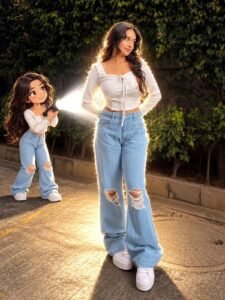
PROMPT- Transform the main subject into a small full-body anime/cartoon version of themselves, matching their hairstyle, outfit, accessories, colors, and recognizable details. Use the reference’s chien modern anime aesthetic she nework slightly compact oversizeil proportions, cel shading, and expressive details. Position the anime character directly behind the real subject, holding a flashlight aimed forward at their back. Create an intense realistic white beam that fully illuminates the subject from behind, producing bright rim light, glow, and natural shadows. Dim the surrounding outdoor light for dramatic contrast. Preserve the original scene, camera angle, composition, and realism.
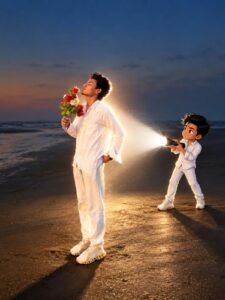
PROMPT- Transform the main subject into a small full-body anime/cartoon version of themselves, matching their hairstyle, outfit, accessories, colors, and recognizable details. Use the reference’s clean modern anime aesthetic sharp linework slightly oversized head, compact proportions, cel shading, and expressive details. Position the anime character directly behind the real subject, holding a flashlight aimed forward at their back. Create an intense realistic white beam that fully illuminates the subject from behind, producing bright rim light, glow, and natural shadows. Dim the surrounding outdoor light for dramatic contrast. Preserve the original scene, camera angle, composition, and realism.
How to Create an Anime Flashlight Photo
Creating this type of AI photo is very simple. Follow these steps:
Step 1: Choose Your Photo
Select a clear photo where your face and body are properly visible. A well-lit portrait or selfie can give better results.
Step 2: Copy the AI Prompt
Copy the Anime Flashlight Photo AI Prompt given above.
Step 3: Upload Your Photo
Open an AI image editing tool and upload your original photo. Then paste the prompt into the chat or image generation box.
Step 4: Generate the Image
Ask the AI tool to edit your uploaded image using the prompt. Wait for the image generation process to finish.
Step 5: Download and Share
Once you are happy with the result, save the image and use it as your Instagram profile picture, WhatsApp DP, social media post, or YouTube thumbnail.
Tips for Better Anime Flashlight Photos
For a better result, keep these tips in mind:
- Use a clear and high-quality photo.
- Choose a photo where your face is clearly visible.
- Avoid heavily blurred or low-resolution images.
- Try different backgrounds for different looks.
- You can change the outfit or pose if your AI tool supports image editing.
- Add words like cinematic lighting, dramatic flashlight, anime style, sharp details, and 4K for a more detailed result.
Final Words
The Anime Flashlight Photo AI Prompt is an easy way to give your normal photo a trendy anime and cinematic flashlight effect. You can experiment with different photos, backgrounds, lighting styles, and anime looks to create your own unique images.
If you like AI photo editing trends, you can also try other popular AI photo prompts and create creative images for your social media profiles.
