Want to create a funny dance video using a celebrity-style AI character? With the help of AI video generators, you can turn a simple photo into an entertaining dancing video in just a few steps. You don’t need advanced video editing skills or complicated software. In this article, I will show you how you can create a Celebrity Funny Dance AI Video using an AI video generator and a simple image-to-video workflow.
What is a Celebrity Funny Dance AI Video?
A Celebrity Funny Dance AI Video is an AI-generated video where a person or celebrity-style character appears to perform funny dance moves. AI tools can analyze an uploaded image and generate motion based on a dance reference, prompt, or selected movement. This makes it possible to create short and entertaining videos for Instagram Reels, YouTube Shorts, TikTok, and other social media platforms.
For better results, use a clear image with the face and body visible properly.
How to Create Celebrity Funny Dance AI Video
Creating a funny AI dance video is quite simple. Follow the steps below.
Step 1: Choose a Good Photo
First, select a high-quality photo of the person or character you want to animate.
A front-facing photo with good lighting usually works better. Try to avoid images where the face is covered or the body is heavily cropped.
Step 2: Open an AI Video Generator
Now open an AI video generator that supports image-to-video generation.
Upload your selected photo and look for options related to image animation, character motion, or AI dance video generation.
Step 3: Add a Funny Dance Prompt
You can use a simple prompt to describe the type of dance you want.
For example:
Funny dance performance, energetic and exaggerated dance moves, playful facial expressions, smooth body movement, entertaining choreography, realistic motion, dynamic camera movement, high-quality video.
You can also change the prompt according to the type of funny dance you want to create.
Step 4: Generate the Video
After adding your image and prompt, start generating the video.
The AI will process the image and create a short animated dance video. Depending on the tool, you may get different results, so you can generate multiple versions and choose the one that looks the most natural.
Step 5: Edit the AI Video
Once your video is generated, you can make it more entertaining using a video editor such as CapCut or VN.
You can add:
•Trending music
•Funny sound effects
•Text and captions
•Zoom effects
•Transitions
•Stickers
•Slow-motion effects
This can make your AI dance video more engaging for social media.
Refrance Video
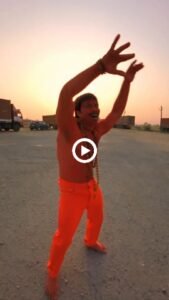
Celebrity Funny Dance AI Video Prompt
If you are looking for a ready-to-use prompt, you can try this:
Recreate the uploaded reference video exactly shot-for-shot as a photorealistic vertical 9:16 video. MOTION & CAMERA LOCK: Copy the reference video’s exact dance moves, body/hand gestures, walking path, timing, rhythm, camera movement, handheld shake, pans, whip-pans, 180° selfie rotations, framing and cuts. Do not add, remove or change any movement. Use the reference video only for motion, camera and timing—not faces, clothes or textures. CHARACTER REPLACEMENT: Reference Image 1 – Dancer: Replace the dancing man with this person. He appears only in the opening dance, performing the exact same movements. He never holds the phone or appears in selfie shots. Reference Image 2 – Camera Operator: He holds the phone throughout the entire video. In both selfie turns, including the first and final selfie, his face, expressions and movements must match the reference video exactly. Reference Image 3 – Passenger: Replace the man exiting the parked car with this person. He exits, walks toward the camera exactly as shown, and remains in the background during the final selfie. He never holds the phone. Preserve all original motion, timing, camera path, framing and scene continuity exactly.
Tips for Better AI Dance Videos
•For better results, keep these things in mind:
•Use a clear image: A high-quality image helps the AI understand the character more accurately.
•Keep the face visible: Avoid images where the face is hidden or covered.
•Use simple prompts: A clear description usually works better than adding too many complicated instructions.
•Try different dance styles: You can experiment with funny, energetic, dramatic, robotic, or trending dance movements.
•Generate multiple versions: AI video results can vary, so creating a few versions can help you find the best result.
Where Can You Use AI Dance Videos?
You can use these videos for entertainment and creative content on platforms such as:
•YouTube Shorts
•Instagram Reels
•Facebook Reels
•TikTok
•Personal AI video projects
If you are using images of real celebrities, make sure your content follows the rules of the platform and does not mislead viewers into believing that the celebrity actually performed or endorsed something.
Final Words
Creating a Celebrity Funny Dance AI Video is now much easier with modern AI video generators. With a good photo, the right prompt, and a little editing, you can create funny and creative dance videos without professional video-editing skills. Try different images, dance movements, prompts, and editing effects to create your own unique AI dance videos.
