Shoes transition videos are becoming popular on Instagram Reels and YouTube Shorts. These videos create a smooth and stylish transition where the shoes or outfit change according to the beat of the music. The good thing is that you can create this type of trending video easily using the VN Video Editor app. In this tutorial, we will learn how to make a Shoes Transition Video using VN App step by step. You don’t need advanced video editing skills to create this effect.
What You Need for Shoes Transition Video
Before starting the editing, you need a few things:
•VN Video Editor App
•Multiple shoe or outfit photos/videos
•A suitable trending song
•Properly recorded clips
•A little basic editing knowledge
For the best result, record all your clips from almost the same camera angle. This will make the transition look much smoother.
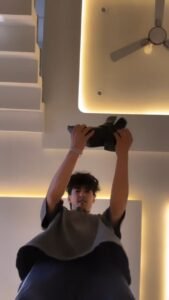
How to Make Shoes Transition Video in VN App
First, open the VN Video Editor app on your phone and create a new project. Select the video clips or photos that you want to use for the shoes transition.
Arrange all the clips in the correct order on the timeline. You can trim unnecessary parts from each clip so that the transition matches the beat of the music.
Add Music
Now add a trending song to your project. You can use the music that matches your video style.
After adding the music, listen to the song carefully and find the main beats. These beats will help you decide where to change from one shoe clip to another.
Adjust the Clips
Trim each clip according to the music beat. Try to keep the clips short so the transition feels quick and smooth.
You can also use the Split option in VN App to cut the clips exactly where you want the transition to happen.
Create the Shoe Transition
Now comes the main part. Place the different shoe clips one after another and make sure the position of the shoes remains similar in every clip.
You can use VN’s transition effects between the clips. For a clean and professional result, avoid using too many effects. Simple transitions often look better.
You can also add a small zoom, shake, or motion effect according to the beat of the music.
Add Beat Effects
To make the video more interesting, add effects exactly when the shoe changes.
For example, you can add a quick zoom-in, flash, shake, or blur effect at the transition point. This makes the shoe change look more powerful and gives the video a trendy Reels-style look.
Make the Transition Smooth
The most important thing in a shoes transition video is timing. The shoe should change exactly with the beat.
Also, try to maintain the same camera position, lighting, and background in every clip. If these elements are similar, the final transition will look much more realistic.
Export the Video
Once your editing is complete, preview the entire video and check whether all transitions are properly synced with the music.
If everything looks good, export the video from VN App in high quality. For Instagram Reels and YouTube Shorts, you can use a 9:16 vertical format.
Final Words
Creating a Shoes Transition Video is easy with the VN Video Editor. By using properly recorded clips, beat-synced cuts, and simple transition effects, you can create stylish videos for Instagram Reels, YouTube Shorts, and other social media platforms. If you are looking for more VN editing tutorials, trending transitions, templates, and video editing ideas, keep following our website for more tutorials.
