Do you want to create a beautiful and romantic Girlfriend AI Video using your own photo? With the help of AI video generators, you can create amazing couple videos with realistic animations, romantic scenes, and cinematic effects. These videos are perfect for Instagram Reels, YouTube Shorts, and other social media platforms. In this article, you will learn how to use a Girlfriend AI Video Prompt to create attractive AI-generated videos in just a few simple steps.
What Is a Girlfriend AI Video Prompt?
A Girlfriend AI Video Prompt is a text instruction that tells an AI video generator how to create a romantic video. You can describe the characters, their appearance, movements, facial expressions, background, camera angles, and overall atmosphere.
By using the right prompt, you can create romantic walking scenes, cute couple moments, holding hands, smiling together, and cinematic love story videos.
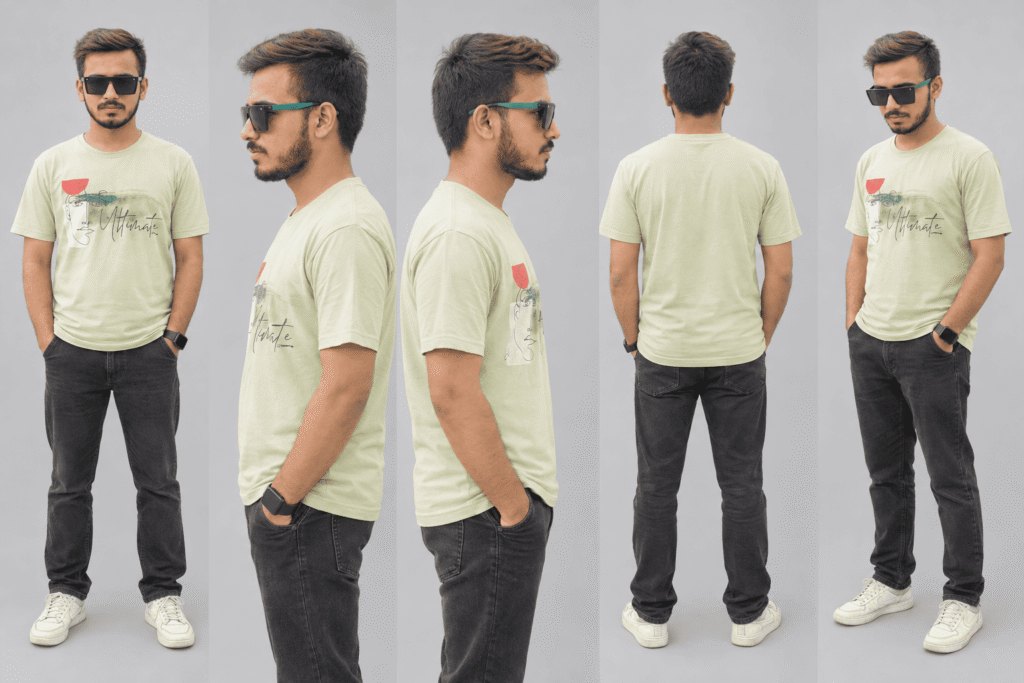
IMAGE PROMPT👇
Create a high-quality, photorealistic character reference sheet using the single uploaded reference photo. The goal is to show the EXACT SAME PERSON from five different views in one single image. IDENTITY AND APPEARANCE — EXTREMELY IMPORTANT: Preserve the person’s exact facial identity, face shape, hairstyle, hair length, hair texture, beard, glasses (if present), skin tone, body proportions, and natural appearance from the uploaded reference photo. Do not modify, beautify, or redesign the person. The person must look exactly the same in every view. OUTFIT CONSISTENCY: Keep the exact same shirt, trousers, clothing colors, patterns, fit, and accessories shown in the original reference photo. Do not change, replace, or redesign any clothing. The hairstyle and outfit must remain identical across all five views. CREATE EXACTLY FIVE VIEWS IN ONE CHARACTER REFERENCE SHEET: 1. FULL-BODY FRONT VIEW: The person standing straight, facing directly toward the camera, with the entire body visible from head to feet. 2. LEFT-SIDE HALF-BODY VIEW: A waist-up portrait showing the person’s exact left-side profile, with the head and upper body turned 90 degrees to the left. Clearly show the natural side profile of the face and the same hairstyle. 3. RIGHT-SIDE HALF-BODY VIEW: A waist-up portrait showing the person’s exact right-side profile, with the head and upper body turned 90 degrees to the right. Clearly show the natural side profile of the face and the same hairstyle. 4. FULL-BODY BACK VIEW: The person standing straight with their back facing the camera. Show the entire body from head to feet. Clearly display the back of the exact same shirt, the hairstyle from behind, and the person’s natural body proportions. 5. FULL-BODY FRONT THREE-QUARTER VIEW: The person standing with their body turned approximately 45 degrees, showing a natural three-quarter front view of the face and body while keeping the same identity, hairstyle, and outfit. LAYOUT AND BACKGROUND: Arrange all five views neatly in one professional character reference sheet. Give each view enough space so that no body parts are cropped, overlapping, or hidden. Use a clean, plain, neutral light-grey studio background with consistent, soft, natural lighting. Keep the camera perspective realistic and consistent. STRICT RULES: – Exactly the same person in all five views. – Exact same face and identity as the uploaded photo. – Exact same hairstyle, hair length, and hair texture. – Exact same shirt, clothing, and accessories. – No different people, no face swapping, no duplicate facial features. – No extra fingers, distorted anatomy, or unnatural body proportions. – No unnecessary text, labels, borders, or decorative elements. – Do not crop the head, feet, or body in any full-body view. – Do not change the person’s age, facial structure, or natural appearance. – Photorealistic quality, sharp details, realistic skin texture, and accurate clothing details. FINAL RESULT: One clean, high-resolution character reference sheet containing exactly five views of the same person, suitable for AI image generation, character consistency, and image-to-video animation.
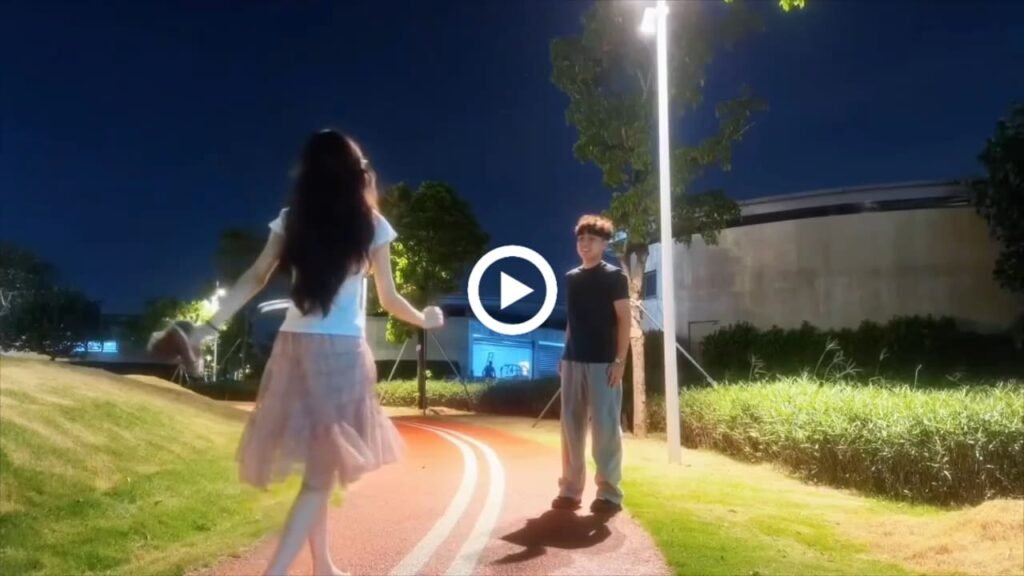
VIDEO PROMPT👇
Create a new, ultra-realistic cinematic romantic video using the uploaded reference video and my uploaded personal photo. IMPORTANT: RECREATE THE ACTIONS, NOT THE ORIGINAL VIDEO. Use the reference video only for the action sequence, body movements, walking, timing, and romantic embrace. Use my uploaded photo as the only identity and appearance reference for the male character. 1. MY EXACT FACE, HAIRSTYLE AND OUTFIT The male character must be me, accurately recreated from my uploaded photo. Preserve my exact face, facial features, hairstyle, hair length, hair texture, skin tone, beard or moustache if present, body proportions, and natural appearance. My clothing must match my uploaded photo exactly, including my shirt or T-shirt, its color, design, sleeves, fit, trousers, and other visible details. Do not copy the original male character’s face, hairstyle, or clothing from the reference video. Replace him completely with me. Do not change my hairstyle, invent a different outfit, or alter my facial identity. My appearance and clothing must remain consistent throughout the entire video. 2. NEW BACKGROUND — ONE CONTINUOUS LOCATION Create a beautiful, wide-open green meadow with lush natural grass, distant trees, an expansive sky, and a warm golden-orange sunset. The environment must look like a real location filmed using a professional DSLR camera, with realistic textures, cinematic golden-hour lighting, natural depth of field, and beautiful sunset colors. The new background must be visible from the very first frame and remain exactly the same until the final frame. Never reproduce the original reference video’s background. Never start with the original background and replace it later. The opening hand action, walking sequence, stopping, raising both arms, woman’s entrance, and final back hug must all take place in this same green field. Maintain the same grass, trees, horizon, sky, sunset, lighting direction, and overall environment throughout the video. When the woman enters, the background must not change. She must walk into the existing scene naturally. No background transitions, no scene changes, no location changes, no cuts, and no sudden changes in scenery. 3. EXACT HAND MOVEMENT — HIGHEST PRIORITY The opening hand movement must follow this precise sequence. Do not invent a different hand gesture. 0.0–1.5 seconds — HOLD ONE HAND WITH THE OTHER At the beginning of the video, I stand in the foreground and hold one of my hands firmly but naturally with my other hand, matching the hand-holding gesture shown in the reference video’s opening action. One hand must visibly hold the other hand. Both hands remain connected in front of my body. Do not make me clap. Do not rub my hands together. Do not repeatedly open and close my fingers. Do not perform unrelated hand gestures. The two hands must remain together in the same position as I begin moving forward. 1.5–3.5 seconds — WALK FORWARD WHILE HOLDING MY HANDS TOGETHER I begin walking forward toward the center of the grassy field while continuing to hold one hand with the other. I MUST KEEP HOLDING MY HANDS TOGETHER THROUGHOUT THE ENTIRE WALK. My hands must not separate during this movement. My arms and hands move naturally with my body while maintaining the same connected hand-holding gesture. Follow the reference video’s walking direction and movement timing as closely as possible. My face, hairstyle, body proportions, and outfit must remain consistent with my uploaded photo. 3.5–4.5 seconds — ARRIVE AND STOP I reach the intended position in the center of the field and stop walking. I remain standing upright, facing away from the camera toward the sunset. While stopping, I briefly keep one hand held by the other. Do not raise my arms before I have stopped walking. 4.5–5.5 seconds — RELEASE MY HANDS AND OPEN BOTH ARMS Only AFTER I have completely stopped, I release one hand from the other. Immediately afterward, I smoothly raise both arms outward and upward, opening them wide to welcome the approaching woman. Both arms must visibly separate and open into a wide, natural embracing gesture. The order is essential: first hold one hand with the other, then walk while keeping the hands together, then stop, then release the hands, and finally raise both arms. Do not skip any step. Do not raise both arms while walking. Do not open my hands before I stop. 4. WOMAN IN A BRIGHT RED SAREE 5.5–6.5 seconds — WOMAN ENTERS After I have stopped and opened both arms, a beautiful adult woman enters naturally from the right foreground. She wears a beautiful, bright red traditional Indian saree with a matching red blouse. Her long black hair flows naturally down her back. Generate the woman automatically. No separate reference photo of the woman is provided. The red saree must remain the same color and design throughout the video. 6.5–8.0 seconds — SHE APPROACHES ME The woman walks toward me while I remain standing with both arms open. She approaches naturally from the right side of the frame. Her saree moves realistically as she walks. Maintain realistic body proportions, natural walking, and consistent character appearances. The background remains exactly the same green meadow and sunset. 8.0–9.5 seconds — ROMANTIC BACK HUG The woman reaches me and stands directly in front of me, with her back toward my chest. I gently wrap both arms around her waist from behind, completing a natural romantic back hug. Ensure anatomically correct arms and hands, realistic physical contact, and natural body positioning. My face, hairstyle, and clothing remain consistent with my uploaded photo. 9.5–13.0 seconds — FINAL ROMANTIC SHOT We remain together in the romantic back hug in the middle of the same green grassy field. The woman continues wearing her bright red saree. The golden-orange sunset illuminates us from behind, creating a beautiful, realistic cinematic atmosphere. End with the same background, lighting, and camera perspective established in the very first frame. 5. CAMERA AND DSLR VIDEO QUALITY Create ultra-realistic live-action footage that looks like it was filmed using a professional DSLR camera. Use natural skin texture, realistic hair, accurate anatomy, realistic hands, natural fabric movement, soft cinematic depth of field, and professional golden-hour lighting. Keep the camera stationary with a consistent wide composition throughout the video. The framing must clearly show the opening hand movement, the complete walk, the moment I stop, the release of my hands, the raising of both arms, the woman’s entrance, and the final back hug. No unnecessary zooming, panning, camera shake, cuts, transitions, or changes in camera perspective. 6. STRICT FINAL RULES MY UPLOADED PHOTO = MY EXACT FACE, HAIRSTYLE, SKIN TONE, BODY PROPORTIONS, AND ORIGINAL CLOTHING. REFERENCE VIDEO = ACTION SEQUENCE, HAND-HOLDING MOVEMENT, WALKING, STOPPING, ARM-RAISING, WOMAN’S ENTRANCE, AND BACK HUG. NEW BACKGROUND = ONE CONTINUOUS GREEN GRASSY MEADOW WITH A GOLDEN-ORANGE SUNSET FROM THE FIRST FRAME TO THE LAST. WOMAN = AN ADULT WOMAN WEARING A BRIGHT RED SAREE THROUGHOUT THE VIDEO. MANDATORY OPENING ACTION ORDER: 1. Hold one hand with the other. 2. Walk forward while keeping both hands together. 3. Reach the destination and stop completely. 4. Release the hands. 5. Raise both arms outward and upward. 6. Wait for the woman in the red saree. 7. Let her approach and embrace her with a natural back hug. Never separate my hands during the walk. Never raise my arms before I stop. Never skip the opening hand-holding movement. Never change my face, hairstyle, or clothing. Never copy the original background. Never change the background when the woman enters. The final video must feature me performing this exact sequence of actions in my original outfit, with a woman wearing a bright red saree, in one continuous, beautiful green meadow at sunset.
How to Create a Girlfriend AI Video
Follow these simple steps to generate your own romantic AI video.
- Open an AI video generator that supports image-to-video generation.
- Upload your photo or the couple’s reference photo, depending on the tool’s features.
- Copy the Girlfriend AI Video Prompt provided above.
- Paste the prompt into the video generation box.
- Select the available video settings and click the Generate button.
- Wait for the AI to create your video, then preview and download the result.
The exact steps may vary depending on the AI video generator you use.
Tips for Creating Realistic Girlfriend AI Videos
Use a clear photo: A high-quality reference image can help the AI preserve facial details.
Write detailed prompts: Describe the characters, actions, background, and camera movement clearly.
Keep movements natural: Simple actions such as walking, smiling, and holding hands often produce more realistic results.
Choose cinematic lighting: Golden-hour sunlight and soft lighting can make your video look more attractive.
Use the right format: Choose a vertical 9:16 aspect ratio for Instagram Reels and YouTube Shorts when available.
Conclusion
Creating a Girlfriend AI Video is easy when you use a detailed prompt and a suitable AI video generator. You can experiment with different romantic scenes, outfits, backgrounds, and camera movements to create unique videos for your social media accounts.
Copy the Girlfriend AI Video Prompt from this article, try it with your preferred AI tool, and create your own beautiful AI love story video.

