Nowadays, AI video editing is making it much easier to create creative and cinematic videos. Earlier, recreating a movie scene required a proper camera setup, actors, locations, costumes, and a lot of editing. But now, with the help of AI tools, you can recreate the look and feel of almost any movie scene using your own creative idea. If you have ever watched a movie scene and thought, “I want to make a video like this,” then AI can help you turn that idea into a short cinematic video. You can create a similar environment, camera movement, lighting, character style, and overall cinematic feeling with the right AI prompt.
How Does AI Movie Scene Recreation Work?
AI movie scene recreation generally works by using an image or video as a reference and then generating a new scene based on your instructions. You can describe the scene in detail, including the location, character, clothes, camera angle, lighting, weather, and movement.
For example, if you want to recreate an action scene, you can describe a character standing on a busy street with dramatic lighting, cinematic camera movement, smoke in the background, and a movie-style atmosphere. The AI can then use these instructions to create a new visual.
The important thing is that you should focus on the style and elements of the scene rather than simply asking the AI to copy the entire original scene.
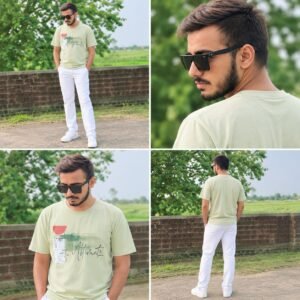
IMAGE PROMPT- /charactersheet photo, It should be a full-body shot; keep the clothing color exactly as it is, The face shot should be a close-up from a side-back 4 angle. And put on a pair of black sunglasses too.
VIDEO PROMPT- Create a photorealistic cinematic action video in a busy Indian city street during daytime. Maintain the exact same character appearance, outfit, body proportions and environment consistently throughout the entire video.
0–2 sec: Start with an extreme close-up, low-angle shot of a man’s black formal shoes and lower legs walking/running rapidly on a dusty roadside. Camera tracks backward very close to the feet, creating strong cinematic motion and realistic dust movement.
2–4 sec: Smoothly transition to a rear tracking shot. The same man, wearing a dark red and black checkered full-sleeve shirt and black pants, runs forward through heavy traffic. A large city bus is directly in front of him, with motorcycles and cars surrounding it. Camera follows directly behind the man at walking/running height.
4–6 sec: The man moves toward the right side of the bus. Camera continues following him from behind. He quickly passes alongside the bus while traffic moves naturally around him. Keep realistic vehicle motion, pedestrians and street details.
6–7 sec: As the man reaches the side/front area of the bus, perform a smooth cinematic camera transition around a vertical foreground object/window frame, revealing the front side of the scene.
7–10 sec: Reveal the same man running directly toward the camera between vehicles. A white Renault-style van is immediately behind him, with motorcycles, auto-rickshaws and other traffic in the background. He runs confidently and urgently toward the camera while maintaining the exact same face, hairstyle, sunglasses, red-black checkered shirt and black pants.
10–12 sec: Camera smoothly tracks backward while the man continues running directly toward the lens. Keep him centered in frame. Background traffic moves naturally, creating realistic depth and motion. End while he is still running toward camera.
Camera: realistic handheld cinematic tracking, low-angle opening, rear-follow tracking shot, smooth side transition, then frontal tracking shot. Natural motion blur, realistic depth of field, subtle camera shake, no unnatural camera movement.
Visual style: ultra-realistic Indian street, natural daylight, cinematic color grading, realistic skin texture, realistic fabric, authentic vehicles, physically accurate shadows, detailed environment, 4K DSLR/movie-camera quality.
Important: One continuous visual flow, no random cuts, no character transformation, no face change, no outfit change, no extra limbs or fingers, no distorted vehicles, no floating objects, no cartoon look. Maintain exact character continuity from beginning to end.
Negative prompt: face distortion, identity change, outfit change, duplicate person, extra arms, extra legs, deformed hands, warped vehicles, floating objects, unnatural running, sudden cuts, camera glitches, cartoon, CGI look, oversaturated colors, low quality, flickering
How to Recreate Any Movie Scene Using AI
First, select the movie scene that you want to use as inspiration. You can take a screenshot or note down the important details of the scene. Look carefully at the character’s position, background, lighting, camera angle, clothes, and overall mood.
After that, create a detailed AI prompt. Your prompt should explain exactly what you want the new scene to look like. The more useful details you provide, the easier it becomes for the AI tool to understand your idea.
This gives the AI much more information about the scene.
Use Your Own Photo for a Personal Movie Scene
One of the most interesting things about AI editing is that you can use your own photo as the main character. Upload your photo to an AI image or video tool and describe the movie-style scene you want.
The AI can place your character into a completely different environment while keeping the overall appearance recognizable.
For example, you can create a scene where you are walking through a futuristic city, standing in a historical location, sitting inside a luxury car, or appearing in an action-style environment.
This is why AI movie scene recreation has become popular for Instagram Reels, YouTube Shorts, and other social media videos.
Turn the AI Image Into a Video
After creating the image, the next step is to convert it into a video. Many AI video tools can animate a still image and add camera movement.
You can give instructions such as:
“Slow cinematic camera movement toward the character, natural body movement, realistic wind, subtle facial movement, dramatic lighting and smooth motion.”
The AI will then try to create movement based on the image and your instructions.
You can also experiment with different camera movements such as zoom-in, zoom-out, tracking shots, close-ups, and slow-motion effects.
Final Words
AI has completely changed the way people create cinematic content. With the right prompt and a little creativity, you can recreate the feeling of a movie scene and turn your own ideas into an AI-generated video.
The process is quite simple: choose a scene for inspiration, create a detailed prompt, generate the image, convert it into a video, and finally add music and cinematic effects during editing.
So, if you have a movie scene in your mind that you always wanted to recreate, now is a great time to experiment with AI and create your own cinematic version.
