Nowadays, AI photo editing is becoming very popular on social media. People are using different AI prompts to transform their normal photos into creative and realistic-looking images. One of the latest creative ideas is the Petrol Pump Photo Editing Prompt, which can give your photo a stylish petrol pump or fuel station look.
If you also want to create a unique photo where you are standing at a petrol pump, filling fuel in a car or bike, or posing beside a stylish fuel station, you can easily create this type of image with the help of an AI photo editing tool.
What is Petrol Pump Photo Editing Prompt?
A Petrol Pump Photo Editing Prompt is a text instruction that tells an AI image editor how you want your photo to look. You can upload your normal photo and use a suitable prompt to create a realistic petrol pump background while keeping your face and overall appearance natural.
You can create different types of petrol pump scenes, such as standing beside a car, sitting on a bike, filling petrol, or posing near a modern fuel station. You can also add cinematic lighting, realistic roads, fuel machines, night lights and other details to make the image look more attractive.
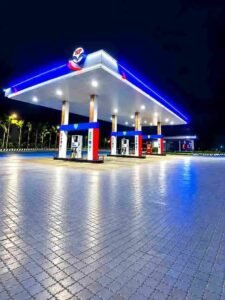
⬆️ऊपर वाले इमेज को डाउनलोड करना होगा
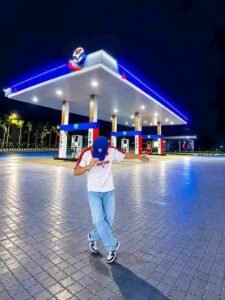
PROMPT- Use the first photo as the exact reference for the person and the second photo as the background/location. Place the same person from the first image naturally into the second image, standing in front of the HP petrol pump at night in the same open-arms pose. Keep his face, hairstyle, skin tone, body shape, clothes, hands, arms and overall proportions exactly the same as the first photo – do not change or regenerate his face. Match his height and scale naturally with the petrol station environment. Make the lighting, shadows, reflections and perspective perfectly consistent with the night-time petrol pump scene. Keep the large petrol station canopy, pumps, trucks, road and surrounding lights clearly visible in the background. Create a highly realistic DSLR-style composite with sharp natural details, realistic skin and fabric texture,cinematic night lighting, subtle blue/red petrol-pump glow, natural ground shadows and reflections. The final image must look like an authentic photograph
How to Create Petrol Pump AI Photo
Creating this type of AI photo is very easy. First, select a clear photo of yourself where your face is properly visible. Then open an AI image editing tool that supports image generation or photo editing.
Upload your photo and enter a detailed Petrol Pump Photo Editing Prompt. The AI will understand the instructions and generate a new image based on your uploaded photo.
For a more realistic result, you should mention important details such as your clothes, pose, petrol pump environment, lighting, camera angle and background. You can also mention that your face should remain unchanged and realistic.
Make Your Photo More Realistic
The main thing in AI photo editing is realism. If the prompt contains clear instructions, the final image can look much more natural.
You can add details like golden hour lighting, night petrol pump lights, cinematic photography, realistic shadows, natural skin texture, DSLR photography and high-resolution details. These small details can make a big difference in the final result.
If you want a trending social media style, you can also create a vertical portrait image that is suitable for Instagram Reels, WhatsApp Status and other social media platforms.
Conclusion
The Petrol Pump Photo Editing Prompt is a simple and creative way to transform an ordinary photo into an interesting petrol pump scene. You do not need professional photo editing skills to create this type of image. Just upload your photo, use a good prompt and let the AI create the scene for you.
You can experiment with different cars, bikes, petrol pumps, outfits, camera angles and lighting styles to create your own unique AI photo. With a little creativity, even a simple photo can be turned into a realistic and stylish social media picture.

1 thought on “Petrol Pump Photo Editing Prompt”