Hello friends, in today’s article we are going to share everything about Instagram Milestone Poster Editing, absolutely free. Using these AI prompts and editing methods, you can create stunning Instagram milestone posters with your own photo in just one click. These posters are currently trending on Instagram, Facebook, and YouTube Shorts because they look professional, clean, and highly realistic.
In this article, we will explain what Instagram Milestone Poster Editing is, why it is going viral, how you can create it using AI tools like Google Gemini, and we will also provide ready-to-use AI prompts that you can simply copy and paste. Make sure you read this article till the end without skipping.
Social Media Milestone Poster Editing
Instagram Milestone Poster Editing is a trending editing style where your photo is combined with Instagram-inspired UI elements like followers count, verified badge, likes, reels, comments, and achievement text using artificial intelligence. The final image looks premium, modern, and social-media ready, as if it were designed by a professional graphic designer.
With AI tools, you don’t need Photoshop skills or advanced editing apps. You just upload your photo, paste a prompt, and the AI automatically creates a cinematic Instagram milestone poster.
Why Is Instagram Milestone Poster Trending on Social Media?
There are several reasons why Instagram Milestone Posters are becoming viral on social media:
• Professional and aesthetic look attracts attention
• Perfect for followers milestone celebration
• Easy to create without editing skills
• AI generates realistic designs in seconds
• Great for reels, shorts, thumbnails, and profile posts
• Looks similar to celebrity and influencer posters
When creators upload these posters, many users ask for the prompts and tutorial, which increases engagement and helps the trend grow even faster.
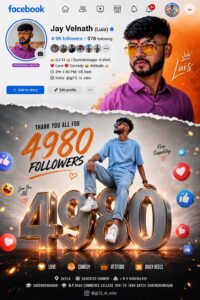
PROMPT- Vibrant Instagram milestone poster celebrating 100K followers. The main subject (YOUR NAME) is stylishly posing in two different positions – one full-body sitting pose on top of a big 3D metallic “100K” text with floating Instagram icons. and another half-body stylish photo above with torn paper effect transition between orange gradient and grey background. The top section shows an Instagram profile interface with username. 100K count. bio, and icons. Generate photo
How to Create Instagram Milestone Poster
You can easily create Instagram Milestone Posters by following these simple steps:
• Open Google Gemini or any AI image editing tool
• Sign in with your Google account
• Upload your clear photo
• Copy any AI prompt
• Paste the prompt with your image
• Click generate and wait 10 to 20 seconds
• Download and save your poster
That’s it. Your viral Instagram Milestone Poster is ready.
Tips for More Realistic Posters
To get the best results, keep these tips in mind:
• Use a high-quality and clear photo
• Use cinematic and realistic keywords in prompts
• Keep the background clean and aesthetic
• Add glowing effects and soft lighting
• Use modern fonts and Instagram-style UI elements
• Slightly increase contrast and sharpness after generating
These small changes can make your poster look much more premium and professional.
Conclusion
We hope this article helped you understand Instagram Milestone Poster Editing easily. These posters are trending very fast and are perfect for social media content creators. By using the prompts and methods shared above, you can create eye-catching milestone posters in just one click without any editing skills.
If you face any issues or want more AI photo editing prompts, you can comment below. We will try our best to help you. You can also check tutorial videos on our YouTube channel Technical Sujit for step-by-step guidance.


Chd
Jitendar Sharma 10000000k pullover 70
Mera photo edit kar do