Hello friends, in today’s article we are going to share everything about Pixel Stretch Effect AI Photo Prompt, absolutely free. Using this AI prompt, you can create stunning pixel stretch effect photos with your own picture in just one click. These creative AI edits are currently trending on Instagram, Facebook, and YouTube Shorts because they give your photos a unique digital art and futuristic look.
In this article, we will explain what Pixel Stretch Effect AI Photo Prompt is, why it is becoming viral, how you can create it using AI tools like Google Gemini, and we will also provide a ready-to-use AI prompt that you can simply copy and paste. Make sure you read this article till the end without skipping.
Pixel Stretch Effect AI Photo Prompt
Pixel Stretch Effect AI Photo Prompt is a trending AI editing style where selected parts of your photo are stretched into colorful pixel trails, creating a modern digital glitch effect. The AI combines realistic portrait details with abstract pixel art, making the final image look futuristic, artistic, and professionally designed.
With AI tools, you don’t need Photoshop knowledge or advanced editing skills. Simply upload your photo, paste the prompt, and the AI automatically creates a high-quality pixel stretch effect within seconds.
Why Is Pixel Stretch Effect AI Photo Prompt Going Viral on Social Media
There are several reasons why Pixel Stretch Effect AI photos are becoming viral on social media:
• Creates a unique futuristic digital art style
• Perfect for Instagram Reels, Facebook, and YouTube Shorts
• Highly realistic AI-generated effects
• No professional editing experience required
• Eye-catching profile pictures and social media posts
• AI generates stunning results within seconds
Because of its creative appearance, these edits receive more likes, comments, and shares, making the trend even more popular.
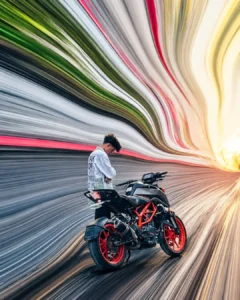
PROMPT- pixel stretch artwork while keeping the main subject perfectly sharp, detailed, and recognizable. Extract colors and textures from the subject and extend them into smooth, flowing pixel-stretch ribbons that follow elegant curves and dynamic motion. Create seamless transitions between the original image and stretched areas, avoiding glitches or harsh edges. The stretched pixels should appear silky, fluid, and organic, like streams of color, light, paint, or energy. Maintain realistic lighting, depth, shadows, and color harmony. Use cinematic contrast, vibrant colors, HDR quality, ultra-sharp details, modern minimalist composition, luxury digital art styling, Adobe Photoshop pixel stretch effect, gallery-quality finishing, and ultra-high-resolution 8K for a visually captivating, social-media-ready masterpiece.
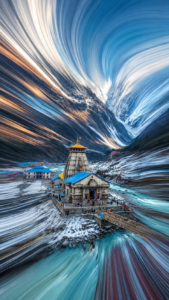
PROMPT- Transform the uploaded image into a premium pixel stretch digital artwork while keeping the main subject perfectly sharp, detailed, and recognizable. Preserve the original identity, silhouette, lighting, and composition of the subject. Extract the colors, textures, and atmosphere from the image and extend them outward into smooth, flowing pixel-stretch ribbons that follow elegant curves and dynamic motion.
Create seamless transitions between the original photo and the stretched areas, with no glitches, broken pixels, or harsh edges. The stretched pixels should look silky, fluid, and organic-like streams of color, light, paint, smoke, or energy flowing through the scene. Maintain realistic depth, shadows, reflections, and natural lighting.
Style: Adobe Photoshop pixel stretch effect, liquid
motion blur, flowing light trails, abstract energy waves, gallery-quality digital artwork, modern minimalist composition, cinematic photography, 8K ultra-high resolution, premium social media aesthetic. Keep the subject untouched and crystal clear while the environment transforms into artistic flowing motion.
How to Create Pixel Stretch Effect AI Photo
You can easily create your Pixel Stretch Effect AI photo by following these simple steps:
Open Google Gemini or any AI image generation tool
Sign in using your Google account
Upload your clear, high-quality photo
Copy the Pixel Stretch Effect AI Prompt
Paste the prompt along with your photo
Click Generate and wait for 10 to 20 seconds
Download and save your edited image
That’s it. Your viral Pixel Stretch Effect AI photo is ready.
Tips for More Realistic AI Photo
To get the best results, keep these tips in mind:
• Use a high-resolution portrait photo
• Keep the background simple and clean
• Include keywords like cinematic, ultra-detailed, pixel stretch, digital art, realistic lighting
• Choose vibrant lighting for a futuristic appearance
• Slightly increase contrast after generating the image for extra depth
These simple adjustments can make your AI-generated photo look even more professional.
Conclusion
We hope this article helped you understand Pixel Stretch Effect AI Photo Prompt easily. This creative AI editing style is becoming one of the biggest trends on social media and is perfect for creating unique profile pictures, reels, and viral posts. By using the prompt and steps shared above, you can generate amazing pixel stretch effect images in just one click without any editing skills.
If you face any issues or want more AI photo editing prompts, you can comment below. We will try our best to help you. You can also check out tutorial videos on our YouTube channel Technical Sujit for step-by-step guidance.
