Hello friends, in today’s article we are going to learn how to create your own IPL Live Batting Video using AI tools for free. Right now, IPL batting videos are trending heavily on Instagram Reels, YouTube Shorts, and Facebook because they look exactly like real live cricket broadcasts.
Using AI, you can turn your normal photo into a cinematic IPL batting scene where you appear as a professional cricketer playing powerful shots inside a packed stadium. The best part is that you don’t need any editing skills, green screen, or expensive software.
In this article, we will explain everything step by step, including how this trend works, why it is going viral, and how you can create your own IPL Live Batting Video using simple AI prompts.
What Is IPL Live Batting Video AI Trend?
IPL Live Batting Video is a new AI editing trend where your photo is transformed into a realistic cricket match scene. In the generated video, you appear wearing an IPL jersey, entering the stadium, holding a bat, and hitting massive sixes like a professional player.
The AI adds:
• Realistic cricket stadium background
• Live broadcast camera angles
• Crowd cheering effects
• Cinematic slow motion shots
• Professional lighting and action scenes
• IPL-style atmosphere
These videos look highly realistic and are getting millions of views on social media platforms.
Why Is IPL Live Batting Video Going Viral?
There are many reasons why this AI trend is becoming extremely popular:
• Cricket fans love IPL-related content
• AI videos look like real TV broadcasts
• Perfect content for Instagram Reels and YouTube Shorts
• Anyone can create videos in just one click
• No professional editing skills required
• Personalized cricket videos attract more engagement
When creators upload these videos, viewers become curious and ask how they were made, which helps videos gain more likes, shares, and followers.
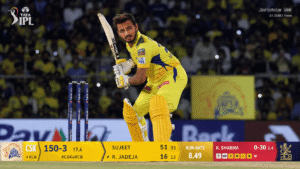
ChatGPT Image Prompt :-
Aspect ratio 16:9, Use reference image for face only — preserve my exact facial structure, hairstyle,
beard, skin tone, beard details, and likeness accurately and he wears the uploaded CSK Jersey.
Create an ultra-realistic frame
captured by an official IPL LIVE BROADCAST CAMERA during a night match between
Chennai Super Kings and Royal Challengers Bengaluru in a packed Indian cricket stadium. I am
playing for CSK as a professional batsman, batting without a helmet so my face is fully visible like a real IPL star on live TV.
The moment captured is just before playing the shot — I am in a realistic batting stance at the crease, knees slightly bent, eyes locked intensely on the incoming ball, bat lifted and ready, body balanced like a professional batsman preparing for a cover drive or pull shot. The pose should feel tense and cinematic, like a real split-second live broadcast
capture before impact. Add dramatic stadium floodlights, roaring crowd, giant LED screens, realistic grass pitch, shallow depth of field, and authentic IPL atmosphere. Include realistic IPL live telecast graphics at the bottom of the screen showing:
“YOUR NAME” as the striker batsman name, CSK vs RCB, live score, overs, strike rate, and
broadcast-style stats exactly like Star Sports or JioHotstar coverage.
The image should look exactly like a real IPL live telecast screenshot — not a selfie, not
a posed photoshoot. Professional sports broadcast camera look, long-lens TV camera
compression, realistic motion anticipation, cinematic framing, ultra-realistic cricket
posture, sweat details, dynamic stadium lighting, 8K sports photography realism,
authentic live-match energy.
Video Prompt :-
0:00–0:03 — Front eye-level IPL broadcast camera angle. I intensely look at the
ball
while standing at the crease for Chennai Super Kings, dramatic floodlights, crowd
roaring,
realistic live telecast scoreboard at bottom showing “YOUR NAME” as striker.
0:03–0:05 — Quick multi-shot close-ups: tightening grip on bat, slight stance
adjustment, focused eyes tracking the ball, bat raised near shoulder, fast-paced
sports
broadcast cuts.
0:05–0:08 — I smash the ball powerfully for a massive six, explosive bat swing,
realistic
cricket physics, crowd instantly erupts cheering loudly. Commentator shouts
excitedly:
“OH HERE YOU GO! WHAT A SHOT BY YOUR NAME!”
0:08–0:12 — Broadcast camera quickly switches to follow the ball flying high
through
stadium lights toward boundary stands for six, fast live telecast pan, crowd going
crazy,
realistic motion blur and TV camera shake.
0:12–0:15 — Camera cuts back to me from front angle calmly watching the ball
travel
with confident expression, crowd roaring behind me, authentic Star Sports /
JioHotstar
IPL live telecast atmosphere, ultra-realistic sports broadcast cinematography, fast-
paced
editing, natural motion, 8K realism.
How To Create IPL Live Batting Video
You can easily create your own IPL batting video by following these simple steps:
- Open Google Gemini or any AI video generator tool
- Sign in with your Google account
- Upload a clear front-facing photo
- Copy the AI prompt given below
- Paste the prompt into the AI tool
- Click on Generate
- Wait for 15 to 30 seconds
- Download your AI-generated IPL video
That’s it. Your realistic IPL Live Batting Video is ready.
Tips To Get Better AI Results
For more realistic IPL batting videos, follow these tips:
• Use a high-quality clear photo
• Upload a front-facing image
• Avoid blurry or dark photos
• Add words like cinematic, ultra realistic, 4K, dramatic
• Use sports jerseys or casual sporty outfits
• Try different prompts for unique results
These small changes can make your final video look much more professional.
Best AI Tools For IPL Video Editing
Here are some popular AI tools you can use:
• Google Gemini
• Kling AI
• PixVerse AI
• Runway ML
• Hailuo AI
• Pika AI
Most of these tools offer free credits for beginners.
Conclusion
We hope this article helped you learn how to create your own IPL Live Batting Video using AI tools. This trend is growing very fast on social media, and anyone can create amazing cricket videos without professional editing knowledge.
By using the AI prompts and methods shared above, you can easily create viral IPL-style batting videos in just a few clicks.
If you want more trending AI video editing prompts and tutorials, you can visit our YouTube channel Technical Sujit for step-by-step guidance.

