Hello friends, in today’s article we are going to share everything about Trending 3 Layer AI Photo Editing Prompt absolutely free. Using these AI prompts, you can create stunning 3 layer cinematic photos with your own picture in just one click. These edits are currently trending on Instagram, Facebook, and YouTube Shorts because they look stylish, modern, and highly realistic.
In this article, we will explain what Trending 3 Layer AI Photo Editing Prompt is, why it is going viral, how you can create it using AI tools like Google Gemini, and we will also provide ready-to-use AI prompts that you can simply copy and paste. Make sure you read this article till the end without skipping.
Trending 3 Layer AI Photo Editing Prompt
3 Layer AI Photo Editing is a new viral editing style where your photo is divided into three cinematic layers with different poses, effects, colors, or zoom styles. The final image looks premium, aesthetic, and professional, just like an Instagram influencer or movie poster.
With AI tools, you don’t need advanced editing skills or heavy apps. You simply upload your photo, paste a prompt, and AI automatically creates a stunning 3 layer portrait in seconds.
Why Is Trending 3 Layer AI Photo Editing Going Viral?
There are several reasons why 3 Layer AI Photo Editing is becoming viral on social media:
• Stylish and cinematic look attracts attention instantly
• Triple layer effect makes photos look unique
• Perfect for Instagram reels and YouTube thumbnails
• AI creates realistic edits within seconds
• No Photoshop or manual editing needed
• Easy to create with just one prompt
When users upload these edits, people quickly ask for the prompt and tutorial, which increases engagement and helps the trend grow even faster.
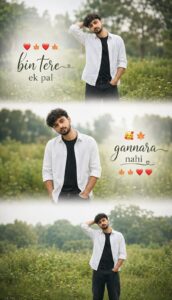
PROMPT- A cinematic vertical triptych collage depicting the same young boy standing alone in a lush green field in bright daylight. The collage is divided into three horizontal frames, with soft, dreamy white transitions between each section. He’s wearing a white shirt over a black t-shirt with jeans, creating a soft, emotional and aesthetic vibe. The background features a hazy green meadow, distant trees, and dreamy natural bokeh with a shallow depth of field. Add romantic, stylish text to the cinematic typography: “❤️🍁❤️🍁 bin tere ek pal 🥰🍁 gannara nahi 🍁🍁❤️❤️”.
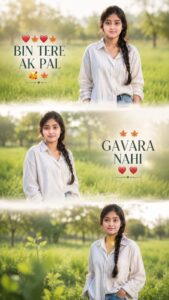
PROMPT- A cinematic vertical triptych collage featuring the same young woman standing alone in a lush green field during bright natural daylight. The collage is divided into three horizontal frames with soft dreamy white transitions between each section. She is wearing an oversized stylish shirt or casual top with jeans, creating a soft emotional and aesthetic vibe. Background contains blurred green grass fields, distant trees, and dreamy natural bokeh with shallow depth of field. Add romantic stylish text: “❤️🍁❤️🍁 BIN TERE AK PAL 🥰🍁 GAVARA NAHI 🍁🍁❤️❤️” in cinematic typography.
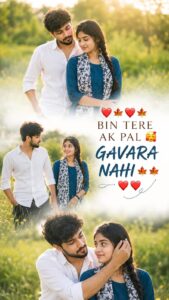
PROMPT- Create a cinematic vertical triptych collage of a stylish romantic couple in a dreamy green field under bright natural sunlight. Divide the collage into three horizontal scenes with soft white fade transitions. Capture emotional candid moments, eye contact, smiles, and natural chemistry for a heartfelt cinematic feel. Outfit styling should look modern, trendy, and aesthetic with soft wind movement in hair and clothes. Background should feature blurred greenery, distant trees, golden sun flare, dreamy bokeh, and shallow depth of field. Add stylish romantic typography: ‘❤️🍁❤️🍁 BIN TERE AK PAL 🥰🍁 GAVARA NAHI 🍁🍁❤️❤️’. Ultra-realistic photography, warm tones, soft skin texture, Instagram-reel aesthetic, dreamy romantic mood, high detail, 9:16 ratio.
How To Create Trending 3 Layer AI Photo Editing
You can easily create this trending AI photo by following these simple steps:
• Open Google Gemini or any AI photo editing tool
• Sign in with your Google account
• Upload your clear high-quality photo
• Copy the AI prompt given below
• Paste the prompt with your image
• Click on generate and wait for a few seconds
• Download your final edited image
That’s it. Your viral 3 Layer AI Photo is ready.
Tips For Better Results
To get the best output from AI photo editing, follow these tips:
• Use a bright and high-quality selfie
• Avoid blurry or low-light images
• Add words like cinematic, ultra realistic, DSLR, 4K
• Try different background colors and outfits
• Slightly increase contrast and sharpness after generating
These small improvements can make your AI image look much more professional and viral-ready.
Conclusion
We hope this article helped you understand Trending 3 Layer AI Photo Editing Prompt easily. This editing style is currently trending fast on Instagram, Facebook, and YouTube Shorts because of its premium cinematic look.
By using the prompts and steps shared above, you can create amazing AI photos in just one click without any editing skills. If you want more AI photo editing prompts and tutorials, you can check out our YouTube channel Technical Sujit for step-by-step guidance.


Create a cinematic vertical triptych collage of a stylish romantic couple in a dreamy green field under bright natural sunlight. Divide the collage into three horizontal scenes with soft white fade transitions. Capture emotional candid moments, eye contact, smiles, and natural chemistry for a heartfelt cinematic feel. Outfit styling should look modern, trendy, and aesthetic with soft wind movement in hair and clothes. Background should feature blurred greenery, distant trees, golden sun flare, dreamy bokeh, and shallow depth of field. Add stylish romantic typography: ‘❤️🍁❤️🍁 BIN TERE AK PAL 🥰🍁 GAVARA NAHI 🍁🍁❤️❤️’. Ultra-realistic photography, warm tones, soft skin texture, Instagram-reel aesthetic, dreamy romantic mood